As an Amazon Associate, Akermin earns from qualifying purchases. Product links on this page are affiliate links.
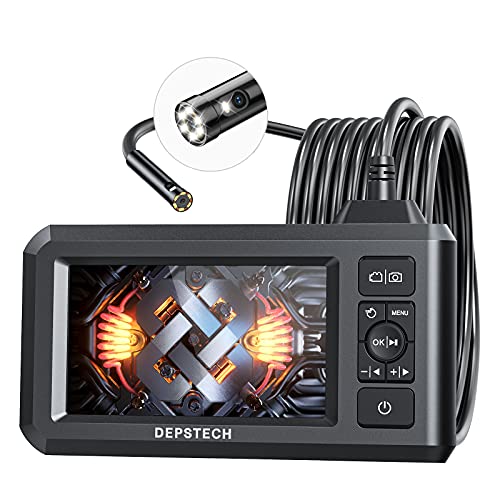
DEPSTECH · DEPSTECH Endoscope Camera with Light, Dual Lens Inspection Borescope 16.5FT | 1080P HD, 4.3" IPS Split Screen, Photo & Video, Semi-Rigid Cable, IP67 Waterproof, for Automotive, HVAC, Plumbing, Mechanic
View on AmazonPrice and availability are shown on Amazon and can change at any time.
A dual lens borescope with front, side and split screen modes, a 4.3 inch TFT IPS panel, 2.0 MP stills and 1080P video, seven adjustable LEDs, 180 degree image rotation, IP67 protection, a 16.5 ft semi rigid cable and about four hours of battery. The specification that sets this listing apart is unglamorous: it publishes a focus range for each camera separately, 3 to 8 cm at the front and 2 to 6 cm at the side. Those two numbers tell you more about what the tool can see than any resolution figure.
Two focus ranges is the detail that matters
Borescope cameras do not autofocus. Each has a fixed focus with a usable window, and outside that window the picture softens no matter what the sensor resolution claims. Most listings in this bracket never mention it. A few state one figure. This one states two.
The front camera window is 3 to 8 cm. The side camera window is 2 to 6 cm. That difference is not an accident and it tells you how the tool was designed to be used.
A front camera looks along a passage, so its subject tends to be a little further away, and 8 cm of reach gives you something useful when travelling. A side camera looks at the wall beside the probe, which in a pipe of modest diameter is one or two centimetres away, so the window is pulled in closer and starts at 2 cm.
The practical consequence is a working rule. If a feature looks soft on the side camera, back the probe off slightly rather than pressing it closer. If it looks soft on the front camera, you are probably too close, not too far. Without the published figures you would be guessing, and most people guess wrong in the direction of pushing nearer.
Split screen changes how you travel a pipe
The listing describes dual lens technology with one button switching between three observation modes, which on this design means front alone, side alone, or both at once.
The third mode is the interesting one. Feeding a probe along a drain with only the front camera live means defects on the wall pass unseen. Switching to the side camera means you are travelling blind. Having both on screen at once means the passage ahead and the wall beside you are visible in the same moment.
It also removes a specific failure. Side branches and junctions are easy to miss because they appear briefly at the edge of a forward view and are gone. A live side view catches them.
The listing attributes the lack of lag to a second CMOS chip supporting the highest recording frame rate and solving the problem of picture delay. Whatever the architecture, the claim being made is that two live feeds do not stutter, which is the thing that would otherwise make split screen unusable.
Dual lens against a side mirror
The listing opens by noting that dual lens technology means switching viewing angles without installing a side mirror, and that comparison is worth taking seriously because the mirror is the cheap alternative and it is genuinely poor.
A clip on mirror reverses the image, so left and right are swapped and your hand movements feel wrong. It loses light, because the LEDs now illuminate a surface the camera sees indirectly. It changes the effective focus distance, because the light path is longer than it looks. And it can be knocked off inside a pipe, which is how retrieval jobs start.
A second camera has none of those problems. It costs more to build and it points in one fixed direction, which is the trade against a steerable head. Our dual lens comparison covers where each approach wins.
What is published and what is missing
| Specification | Published in the listing |
|---|---|
| Cameras | Front and side, plus split screen, three modes |
| Front focus range | 3 to 8 cm, 1.2 to 3.1 in |
| Side focus range | 2 to 6 cm, 0.8 to 2.4 in |
| Camera field of view | 70 degrees |
| Capture | 2.0 MP stills, 1080P video |
| Screen | 4.3 inch TFT IPS, about 170 degree viewing angle |
| Lighting | Seven LEDs, three brightness levels |
| Image orientation | 180 degree rotation |
| Cable | 16.5 ft semi rigid |
| Protection | IP67 |
| Battery | About four hours, USB recharge |
| Warranty | 24 months |
| Memory card | Not included, stated explicitly |
| Probe diameter | Not stated in the listing bullets |
The missing probe diameter is the one real gap, and it is the same gap that undermines most listings in this category. For drain and duct work a few millimetres either way rarely matters. For a specific access hole it decides everything, so establish it before buying if your target is tight.
The 24 month warranty is longer than the twelve months common here, and the explicit note that no card is supplied is the kind of small honesty that makes the rest of a listing easier to trust.
Who should buy it
This suits drain, duct, chimney and cavity work where you travel a distance and then examine a surface. The split screen is a genuine advantage for that pattern, the published focus windows let you work deliberately instead of by trial, and four hours plus IP67 covers a real job.
It is not a tight access tool, because the diameter is unpublished. It is not a cylinder bore tool, because nothing here steers and the side camera points where it points. And buy a memory card with it, since the listing tells you plainly that none is in the box.
Recommended Tools


Products shown because their documented specifications fit this guide. Price and availability are on Amazon and can change.
Frequently Asked Questions
Why do two focus ranges matter more than one?
Because the two cameras are used at different distances and a single figure would hide that. The listing states 3 to 8 cm for the front camera and 2 to 6 cm for the side. The side camera is sharp closer in, which makes sense because it looks at a pipe wall a couple of centimetres away, while the front camera looks along a passage. Knowing both means you know which lens to use for a given target instead of guessing why an image is soft.
What is split screen for?
Showing both cameras at once. The listing describes switching between three observation modes, which on a dual lens unit means front, side, and both together. Travelling along a pipe with both views live means you see what is ahead and what is passing beside you without stopping to switch, which is the difference between finding a side branch defect and sailing past it.
What does the FOV 70 degree button do?
The listing describes it as giving a wider viewing angle even in a narrow place. Read alongside the 170 degree figure quoted for the screen, these are two different measurements: 70 degrees is the camera field of view and 170 degrees is the horizontal viewing angle of the IPS panel, which is about how far off axis you can sit and still read it. Those get conflated in many listings and it is worth keeping them separate.
Is the missing memory card a problem?
It is an inconvenience the listing is upfront about, stating No TF Card in the package contents with an exclamation mark. Buy one at the same time. Being told is better than discovering it, and plenty of listings in this category leave the omission for the unboxing.
What is not published?
The probe diameter, which is the first thing a buyer needs and is absent from the bullets. There is also no articulation, which is expected on a dual lens design, and no stated storage capacity since no card is included.
Affiliate disclosure: Akermin earns a commission from qualifying Amazon purchases made through links on this page. Our editorial picks are based on documented specifications and owner feedback, not commissions.
Related Guides

FLIR One USB-C Thermal Imaging Camera Review: The Phone-Attachment Baseline
A detailed review of the FLIR One USB-C thermal camera for Android, explaining its Vivid IR upscaling, MSX image blending, stated accuracy and the practical limits of a phone-attachment design.
Read More→
Wagner Meters Orion 950 Pinless Wood Moisture Meter: A Review for Thermal Inspection Work
A review of the Wagner Meters Orion 950 pinless wood moisture meter, explaining its dual depth measurement, Bluetooth reporting, and where it stops being the right instrument next to a thermal camera.
Read More→
Tramex Moisture Encounter ME5 Review: The Dual-Depth Pinless Meter
A detailed look at the Tramex ME5 pinless moisture meter, centered on its dual-depth measurement and its practical limits.
Read More→