As an Amazon Associate, Akermin earns from qualifying purchases. Product links on this page are affiliate links.
If you are starting from nothing, P1 is the pick because it is the only complete system here: a 16.4 ft semi-rigid probe, an IP67 head and a phone app, with no monitor to buy. If you already own a Teslong NTS500 or NTS300 monitor, the choice changes completely, and P3 is the more useful probe of the two because its 10 ft gooseneck reaches further down a drain run and its triple lens adds a close-focus side view for inspecting joints. P2 is the same family of product in a shorter 3.3 ft length with a dual lens, and its shorter reach makes it better suited to close work than to drain runs. Note that both P2 and P3 are replacement cables only and cannot be used alone.
Why a drain camera is a reach problem before it is a resolution problem
Most buying advice for inspection cameras leads with resolution, and for drains that is the wrong end of the problem. A 1920×1440 image of a pipe you cannot get the camera into is worth nothing. What decides whether a drain inspection works is whether the probe can be pushed through a trap, steered around a bend, and laid along the invert of the pipe far enough to see the fault.
That is why the cable construction matters more than the sensor. A semi-rigid or metal gooseneck cable can be shaped and then holds that shape, so you can push it and rotate it from the entry point. A limp cable coils in the trap and never reaches the run. Both cable types in this comparison are described as semi-rigid or metal gooseneck, which is the right starting point.
The second reach factor is length. P1 offers 16.4 ft, P3 offers 10 ft, and P2 offers 3.3 ft. Those are not interchangeable. A 3.3 ft probe is a close-inspection tool for a trap, a fitting or a short accessible section. A 10 ft or 16.4 ft probe is what you need to look along a branch run. If you cannot state how far you need to reach, measure it before you buy, because no amount of image quality compensates for a cable that stops short.
Water, traps and the IP67 rating in plain terms
Drains are wet, and standing water is normal rather than exceptional. The relevant rating on all three products is IP67. In the standard IP scheme, the 6 is dust tight and the 7 means the enclosure survives temporary immersion, typically defined as 1 m for 30 minutes. The listings do not all state their immersion test conditions in the same way.
P1 is the specific one: the listing states the camera can operate underwater up to 3.28 ft for 1 hour. That is roughly 1 m for an hour, which is a sensible margin for a blocked drain full of standing water. P2 and P3 are both described as IP67 rated for wet environments, and P3 adds that the connector is water safe for pools, plumbing and rain. Neither P2 nor P3 publishes a depth or duration figure, so do not assume a specific immersion limit beyond the rating itself.
One practical point the ratings do not cover: the joint between probe and monitor or phone. Water travels along a cable. If the connector is sitting in a puddle while you work, the rating of the camera head tells you nothing about the connector. Keep the connector end dry and above the water line.
Complete system or replacement probe: the compatibility trap
This is the single most important distinction on this page, and it is where a buyer can waste money. P1 is a complete system. It connects to a phone running iOS 9.0+ or Android 7+ through the supplied interface and the SUP-ANESOK app, and it needs nothing else to work.
P2 and P3 are not systems. Both listings carry the same warning in their first bullet: this is a replacement camera cable only, it cannot be used alone, and it must be compatible with an NTS500 or NTS300 monitor. If you do not already own one of those monitors, P2 and P3 are not products you can buy and use. They are spares or upgrades for an existing kit.
| Product | Type | Probe diameter | Cable length | Lens arrangement | Water rating | Works alone |
|---|---|---|---|---|---|---|
| P1 | Complete phone-based system | 7.9 mm | 16.4 ft | Single lens | IP67, immersion to 3.28 ft for 1 hour | Yes, with a phone |
| P2 | Replacement cable | 5.5 mm | 3.3 ft | Dual lens, front and 90 degree side | IP67, depth not stated | No, needs NTS500 or NTS300 |
| P3 | Replacement cable | 7.9 mm | 10 ft | Triple lens, one close-focus side camera | IP67, depth not stated | No, needs NTS500 or NTS300 |
Read the table left to right and the decision usually makes itself. If the last column says no, the product is only relevant to you if the monitor is already on your shelf.
The three drain scope options
Kinpthy phone-based endoscope, 16.4 ft single lens
The only complete system here. A 7.9 mm probe on a 16.4 ft semi-rigid cable that connects to an iOS or Android phone, so there is no separate monitor to buy. The listing states a 2.0 MP sensor producing 1920×1440 stills and video, eight adjustable LEDs, and an IP67 head rated for immersion to 3.28 ft for one hour. For a drain, the reach and the waterproof rating matter more than the pixel count: 16.4 ft is enough to get past a trap and along a short branch, and IP67 means the head tolerates the wet part of the job. The semi-rigid cable is the mechanism that makes this work, because it can be pushed and steered rather than flopping like a loose wire.
Teslong dual lens replacement cable, 3.3 ft
A replacement probe, not a camera system. The listing is explicit that this is a camera cable only, that it cannot be used alone, and that it must be paired with an NTS500 or NTS300 monitor. What it adds over a single-lens probe is a second camera set at 90 degrees on the same head, so you can switch between looking forward and looking at the pipe wall without pulling the probe back out. The 5.5 mm probe diameter is the smallest here, which helps in tight pipe. The 3.3 ft metal gooseneck is short, so treat this as a close-inspection probe rather than a drain-run tool.
Teslong triple lens replacement cable, 10 ft
Also a replacement probe for an NTS500 or NTS300 monitor, and the more drain-appropriate of the two Teslong cables because of the 10 ft metal gooseneck. The listing describes a triple lens head with one side camera set up as a close-focus camera, which is the one that matters when you are trying to read the condition of a joint or a crack rather than just confirm the pipe is clear. The 7.9 mm probe is thicker than the P2 probe, so it needs a slightly larger bore to pass. IP67 rated, with an aerospace connector the listing says is water safe for pools, plumbing and rain.
What the side-view cameras actually buy you in a pipe
A forward-facing camera in a drain shows you a tunnel. It is good at answering one question, which is whether the pipe is clear ahead of the probe. It is poor at answering the question that usually matters, which is what the pipe wall and the joints look like.
That is the case for the multi-lens heads on P2 and P3. P2 adds a second camera set at 90 degrees to the front lens. P3 goes further with a triple lens arrangement, and its listing singles out one side camera as a close-focus camera for observing closer details. In practice, a side camera lets you hold the probe at one depth and sweep the wall without withdrawing and re-inserting it, and a close-focus side camera lets you stop on a suspect joint and look at it properly.
The trade is bore size. P2’s probe is 5.5 mm and P3’s is 7.9 mm, the same as P1’s. In a small-bore waste pipe, the smaller probe passes more easily, which is the one clear advantage P2 holds over P3. In a larger drain run, the 7.9 mm probe is not a problem and the extra reach and extra lens are worth more. If you are working on domestic waste pipes of unknown bore, measure the smallest one you expect to enter before choosing.
Where a drain scope stops being the right tool
A camera shows you the inside of a pipe. It does not tell you why the pipe is wet, where a leak is losing water into the ground, or whether a wall is damp because of a drain defect or a failed membrane. Those are different questions and they need a different instrument.
If the job is finding a leak rather than inspecting a pipe interior, a thermal camera can show the temperature pattern of water escaping behind a surface, and it does so without entering the drain at all. Our guide to thermal cameras for finding water leaks covers that approach. For drain-adjacent work, it is common to use both: a thermal camera to find the wet area, then a scope to confirm the cause inside the pipe.
There is also a limit on what any of these cameras can prove. They confirm what is visible. They do not measure flow, they do not detect a gas leak, and they are not a substitute for a pressure test or a CCTV survey with a push rod and a locator. If the question is where exactly under the garden a collapsed pipe sits, a camera alone will not answer it. If the question is whether a pipe is worth replacing, the camera is the right tool, and reach and waterproofing are the specifications that decide whether it works.
Maintenance that keeps a drain scope usable
Two habits keep these tools working. The first is drying and cleaning the probe after every wet job. Drain water carries grit and biological film, and that film sits on the lens and around the LED ring. A soft cloth and clean water on the head, then a full dry before storage, prevents the cloudy image that owners often blame on the sensor. Never coil a wet cable tightly against the connector.
The second is care of the cable itself. A semi-rigid or metal gooseneck is designed to be shaped, but repeated sharp bends at the same point will eventually work-harden and crack it. Coil it in a large loop rather than a tight bundle, and avoid pulling the head out of a trap by the cable alone. The connector end on P2 and P3 is described as an aerospace connector; treat it as the fragile end, because it is the part that fails first when water gets in.
If you already run a Teslong monitor and are deciding between the two probes, the practical rule is simple. Buy P3 if you need to reach along a run and want the close-focus side view. Buy P2 if your work is confined to tight, small-bore fittings and the 5.5 mm probe is the deciding factor. If you own neither a monitor nor a scope, buy P1 and skip the replacement cables entirely.
Recommended Tools
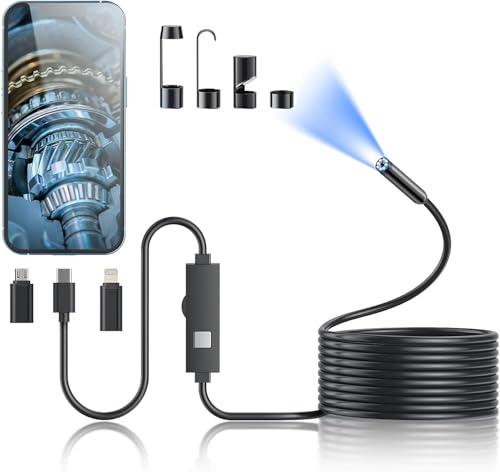


Products shown because their documented specifications fit this guide. Price and availability are on Amazon and can change.
Frequently Asked Questions
Can I use P2 or P3 without buying anything else?
No. Both listings state plainly that these are replacement camera cables only, that they cannot be used alone, and that they must be compatible with a Teslong NTS500 or NTS300 monitor. If you do not already own one of those monitors, neither probe is a usable purchase on its own. P1 is the only product here that works as a complete system.
What does IP67 actually guarantee on these cameras?
IP67 means dust tight and protected against temporary immersion. P1's listing gives the specific figure, immersion to 3.28 ft for 1 hour, which is about 1 m for an hour. P2 and P3 are both described as IP67 rated for wet environments, but neither publishes a depth or a duration, so treat the rating as the limit of what is stated. The rating applies to the camera head, not to the connector, so keep the connector end out of standing water.
Is 16.4 ft enough to inspect a drain?
It depends entirely on the run. 16.4 ft on P1 will get past a trap and some way along a branch, but a long external run or a run with several bends will need more. P3 offers 10 ft and P2 only 3.3 ft, which is close-inspection length rather than drain-run length. Measure the distance from your access point to the furthest point you need to see before choosing, because cable length is the one specification you cannot work around.
Does a higher resolution camera mean a better drain inspection?
Not on its own. The listing for P1 states 1920x1440 stills and video from a 2.0 MP sensor, which is a reasonable image for pipe work. But image quality only matters once the camera is in the right place. A 3.3 ft probe with a perfect sensor cannot inspect a 15 ft run. Reach, cable stiffness and waterproofing decide whether you get an image at all; resolution decides how much detail is in it.
What is the advantage of the side-view lenses on P2 and P3?
A front-facing lens shows you the tunnel ahead. A side lens, set at 90 degrees on the same head, lets you look at the pipe wall and at joints without withdrawing the probe. P3's listing describes one of its side cameras as a close-focus camera for nearer details, which is useful when you want to examine a specific joint. The cost is probe diameter: P2's head is 5.5 mm and P3's is 7.9 mm, so the smaller probe passes tighter pipe more easily.
Will a drain camera find a leak or a gas problem?
No. A camera shows the inside of the pipe. It does not measure flow, it does not detect gas, and it does not locate a leak that is escaping into the ground around the pipe. For water escaping behind a surface, a thermal camera is the better first tool, and our guide to thermal cameras for finding water leaks explains that method. Use the scope afterwards to confirm the cause inside the pipe.
Affiliate disclosure: Akermin earns a commission from qualifying Amazon purchases made through links on this page. Our editorial picks are based on documented specifications and owner feedback, not commissions.
Related Guides
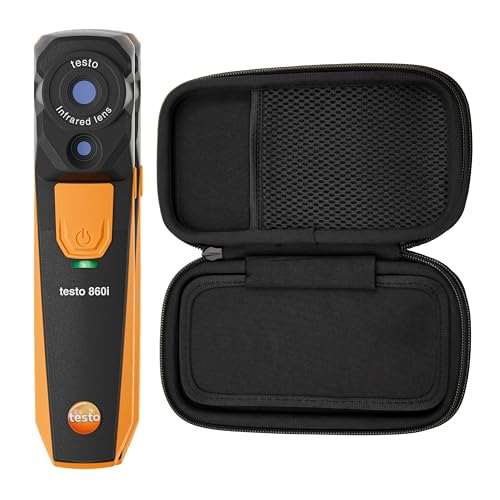
testo 860i Review: Compact App-Connected Thermal Imaging
A wireless 256×192 thermal camera that streams to the testo Smart App over Bluetooth and Wi-Fi, with radiometric images, a -20 °C to 350 °C range and IP54.
Read More→
TOPDON TS001 Review: Articulating Thermal Imaging for Hard-to-Reach Areas
A 256×192 Android thermal camera with a 9 mm adjustable-focus lens (0.1 m to 500 m), a -20 °C to 550 °C measurement range and a monocular detection mode.
Read More→
TOPDON TC002C Review: Compact USB-C Thermal Imaging
The TC002C Duo is a USB-C thermal camera for iPhone 15 and newer, iPad, Android and Windows with a 256×192 detector, 25 Hz refresh and 40 mK sensitivity.
Read More→