As an Amazon Associate, Akermin earns from qualifying purchases. Product links on this page are affiliate links.
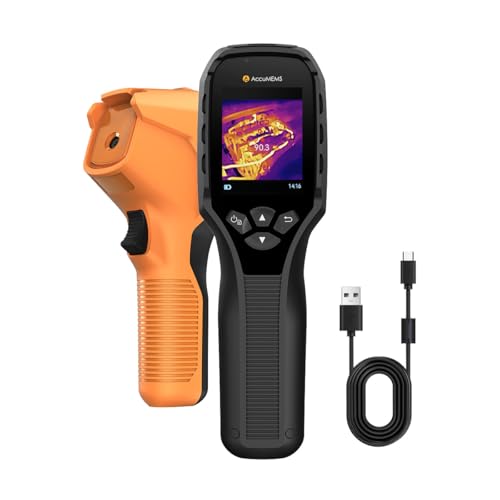
The AccuMEMS GT14S 240 g and the AccuMEMS GT14S edge enhancement are the only two picks on this page whose listings publish a NETD figure, both quoted as less than 50 mK, which is the number that matters for finding small temperature differences in a floor or a wall. The FLIR E8 Pro is the pick when you need higher native resolution and cloud image handling, and its listing does not publish NETD at all. The Flagfront 240 x 240 TISR is the pick when you want a stated super-resolution mode and a drop rating, and its listing also does not publish NETD. If your work depends on resolving a fraction of a degree, the two AccuMEMS listings are the only ones here that give you the number up front, and the AccuMEMS GT14S 240 g and the AccuMEMS GT14S edge enhancement are functionally identical, so availability should decide between them.
What NETD actually measures, and why the number is often missing
NETD stands for noise equivalent temperature difference. It is the temperature difference that produces a signal equal to the noise floor of the detector. In plain terms, it is the smallest temperature contrast the camera can show as a contrast rather than as random speckle. A camera with a low NETD can render a faint thermal gradient, such as the slow spread of a leak under a screed, as a smooth shape. A camera with a high NETD renders the same scene as a mostly uniform field with a few brighter patches.
The unit is millikelvin, written mK. One kelvin is one degree Celsius of difference, so 50 mK is 0.05 of a degree. A listing that says NETD < 50 mK is claiming the camera can resolve a contrast of about five hundredths of a degree. That is a useful figure for building envelope work, underfloor heating surveys and any task where the target is only slightly warmer or cooler than its surroundings.
The reason many listings omit NETD is that it is hard to state honestly. It depends on the lens, the ambient temperature, the frame rate and the calibration of the specific unit. A manufacturer who has not measured it across a production run will often leave it out rather than publish a number that a buyer might hold them to. When a listing does publish it, that is a signal the manufacturer is willing to be compared on the specification. When it does not, you are being asked to trust resolution and sensor size instead.
None of the four listings on this page publish a detector material, a pixel pitch or a calibration certificate. Those are the numbers that would let you compare sensitivity rigorously. What you have is what each manufacturer chose to state.
What each of the four listings publishes, side by side
The table below uses only figures that appear in the supplied listing text. Where a listing is silent, the cell says so. Do not read a blank as a zero.
| Specification | FLIR E8 Pro | Flagfront | AccuMEMS GT14S | AccuMEMS GT14S edge |
|---|---|---|---|---|
| Published NETD | Not stated in the listing | Not stated in the listing | NETD < 50 mK | NETD < 50 mK |
| Thermal resolution | 320 x 240, 76,800 pixels | 240 x 240 super resolution | Not stated in the listing | Not stated in the listing |
| Temperature range | -20 to 550 C | -4 F to 1022 F | -4 F to 1022 F | -4 F to 1022 F |
| Frame rate | Not stated in the listing | 25 Hz | Not stated in the listing | Not stated in the listing |
| Field of view | Not stated in the listing | Not stated in the listing | 50 degrees | 50 degrees |
| Alarms | Not stated in the listing | High and low temperature alarm | Custom high and low temperature alarms | Custom high and low temperature alarms |
| Emissivity adjustment | Not stated in the listing | Yes | Yes | Yes |
| Weight | Not stated in the listing | Not stated in the listing | 240 g | 240 g |
| Drop and water rating | Not stated in the listing | 6.6 ft drop, IP54 | Not stated in the listing | Not stated in the listing |
| Cloud or app | FLIR Ignite, OTA updates | Not stated in the listing | Not stated in the listing | Not stated in the listing |
Two things stand out. First, the AccuMEMS GT14S 240 g and the AccuMEMS GT14S edge enhancement publish the same NETD, the same range, the same weight and the same field of view. The listings are near duplicates. Second, the two listings that publish NETD are the two that publish the least about resolution, and the two that publish resolution publish no NETD. That is not a coincidence; it reflects what each brand chose to compete on.
Four cameras, and what each listing publishes about sensitivity
FLIR E8 Pro
The highest native thermal resolution here at 320 x 240, with MSX image enhancement and cloud upload, but the listing does not publish a NETD figure.
Flagfront 240 x 240 TISR
Publishes a 240 x 240 super-resolution mode, a 25 Hz refresh rate and a 6.6 foot drop rating, but no NETD figure.
AccuMEMS GT14S 240 g
The only listing here that publishes NETD, quoted as less than 50 mK, alongside a 50 degree field of view and a 240 g body.
AccuMEMS GT14S edge enhancement
Functionally the same camera as the AccuMEMS GT14S 240 g, with the same published NETD figure and the same measurement range, differing only in the listing’s emphasis on edge enhancement and its wording.
The mistake that makes a low NETD figure useless
A low NETD tells you the detector can resolve a small contrast. It does not tell you the camera will show that contrast on the screen. Three things sit between the detector and your eye.
The first is the display. A camera with a modest screen and a fixed colour palette will compress the thermal range into a narrow band of colours. If the palette is not adjustable, a 0.05 degree difference can be mapped to the same shade as the surrounding wall. This is why level and span control matters. Both AccuMEMS GT14S 240 g and the AccuMEMS GT14S edge enhancement list adjustable level and span, which lets you narrow the displayed range around the temperature band you care about. Without it, a low NETD is a number on a datasheet rather than a tool.
The second is emissivity. Every surface radiates differently. Bare copper, polished steel and glass have low emissivity and reflect the surroundings rather than showing their own temperature. A camera that lets you set emissivity, as the Flagfront 240 x 240 TISR, the AccuMEMS GT14S 240 g and the AccuMEMS GT14S edge enhancement all state they do, lets you correct for the material. A camera that does not, as the FLIR E8 Pro’s listing is silent on, leaves you applying a mental correction. For a floor survey, the mistake is usually not the camera; it is reading a reflection as a hot spot.
The third is focus. A thermal lens with a fixed focus is sharp at one distance. If you are inspecting a wall from a metre away and the lens is focused at three metres, the image is blurred and the contrast you paid for is smeared away. None of the four listings on this page state a focus type. If you need to work at a fixed close distance, a manual focus camera is a different purchase, and the page on thermal cameras with manual focus covers that trade.
Where low NETD stops being the answer
There is a real ceiling on what sensitivity buys you. If the target is not actually a different temperature from its background, no detector will show it. A dry wall with no moisture and no insulation defect is uniform, and a camera that resolves 0.05 degrees will show it as uniform. Low NETD helps you see a small real difference; it does not create one.
The second ceiling is the environment. A camera pointed at a scene where every surface is within a fraction of a degree of every other surface, such as a well insulated room in steady state, will produce a low contrast image regardless of the detector. You need a temperature difference to work with, which is why surveys are done with heating on or with solar loading on the wall.
The third ceiling is the task. If you are looking for a hot electrical joint at 80 C against a 20 C background, a camera with a modest NETD will find it easily. The contrast is large. Low NETD is a purchase you make for small contrasts, not for every thermal job. If your work is mostly large temperature differences, a cheaper camera with a higher NETD will do the same job, and the page on budget thermal cameras is the honest place to start.
Finally, the category stops being right when the question is not about temperature at all. A thermal camera cannot tell you whether a gas is present, whether a wire is live, or whether a surface is wet. It shows temperature. Moisture and insulation defects are inferred from the pattern of temperature, not measured directly. If you need to prove a leak rather than narrow down where it might be, the thermal camera is the first tool, not the last.
Choosing between the four, and the case for buying nothing
Start with the question you are actually asking. If it is “what is the smallest temperature difference I can see”, only the AccuMEMS GT14S 240 g and the AccuMEMS GT14S edge enhancement answer it, and they answer it identically. Both publish NETD < 50 mK. The listings are so close that choosing on features is inventing a difference. Choose on availability. If one is in stock and the other is not, that decides it.
If the question is “how much detail is in the image”, the FLIR E8 Pro has the strongest published case, at 320 x 240 native pixels with MSX edge enhancement. MSX overlays visual outlines on the thermal image, which helps you recognise what you are looking at even when the thermal contrast is low. That is a different route to a usable image than a low NETD figure, and for electrical inspection it is often the more useful one. The page on thermal cameras for electrical inspection goes further into that trade.
If the question is “will it survive the van and the ladder”, the Flagfront 240 x 240 TISR is the only listing here that publishes a drop rating and an IP code, and it also publishes a 25 Hz refresh rate, which matters when you are panning across a wall and want the image to keep up. Its super-resolution mode is stated as 240 x 240; note that super resolution is a processing step, not native pixels, and the listing does not say what the native resolution is.
The case for buying nothing is real if your only task is to check whether a radiator is warm or whether a circuit breaker is hot. Those are large contrasts. A basic camera will show them, and a low NETD specification will not change the answer. Buy sensitivity when the job has small contrasts and a consequence for missing them.
Recommended Tools


Products shown because their documented specifications fit this guide. Price and availability are on Amazon and can change.
Frequently Asked Questions
What NETD figure should I look for in a thermal camera?
Lower is better, and the useful threshold depends on the task. For building envelope work and underfloor heating, where you are looking for a fraction of a degree of contrast, a published figure of 50 mK or lower is a reasonable target. Two listings on this page publish NETD < 50 mK. The other two do not publish NETD at all, so you cannot compare them on that basis.
the AccuMEMS GT14S 240 g and the AccuMEMS GT14S edge enhancement look identical. Are they the same camera?
The supplied listings are near duplicates. Both publish NETD < 50 mK, a -4 F to 1022 F range, a 50 degree field of view, 240 g weight, seven colour palettes, thermometer mode and adjustable emissivity. The differences are in wording and emphasis, not in stated specification. Treat them as one product and choose on availability.
Does a low NETD camera also have higher resolution?
No. NETD is about contrast sensitivity, resolution is about spatial detail. A camera can have a low NETD and a modest pixel count, or a high pixel count and a higher NETD. The FLIR E8 Pro publishes the highest resolution here at 320 x 240 but no NETD. The AccuMEMS GT14S 240 g and the AccuMEMS GT14S edge enhancement publish NETD but no resolution. You are choosing which specification matters for your work.
Can I trust a listing that claims 2 percent temperature accuracy?
the Flagfront 240 x 240 TISR's listing states an accuracy error within 2 percent. That is a percentage of reading, not a fixed number of degrees, and it is stated without a reference temperature or a calibration basis. Treat it as the manufacturer's claim. For any measurement where the number will be recorded or acted on, you need a calibration certificate and a stated uncertainty, neither of which appears in any of these four listings.
Will a low NETD camera find a water leak?
It will show you a temperature pattern that you can interpret as a possible leak, if the leaking water is a different temperature from the surrounding surface. It does not detect water. Evaporative cooling and thermal mass usually create a visible contrast, which is why thermal cameras are used for this, but the camera is narrowing down where to look, not proving the leak. The page on thermal cameras for finding water leaks covers the workflow.
Is a thermal camera a safety device?
No. None of these cameras is an alarm, a gas detector or a live-circuit indicator. A thermal camera shows surface temperature. It does not detect carbon monoxide, combustible gas or voltage. If you need a safety function, buy the instrument that performs that function; a thermal camera is a diagnostic tool that sits alongside it.
Affiliate disclosure: Akermin earns a commission from qualifying Amazon purchases made through links on this page. Our editorial picks are based on documented specifications and owner feedback, not commissions.