As an Amazon Associate, Akermin earns from qualifying purchases. Product links on this page are affiliate links.
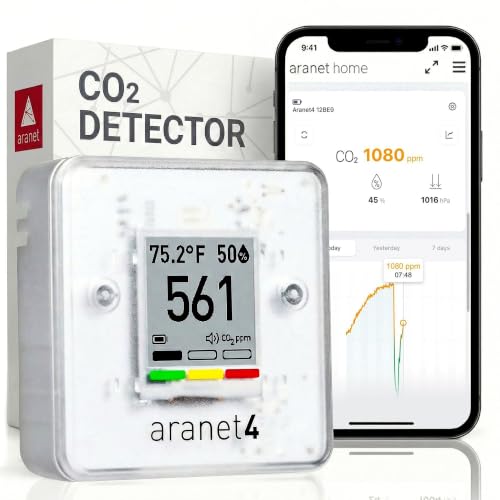
For a printer room the useful combination is a particulate measurement plus a CO2 measurement, and no single listing here publishes both with a stated method. The AQItech 16-in-1 Indoor Air Quality Monitor is the most direct particulate pick: it publishes PM2.5 and PM10 with a rechargeable battery and an audible threshold alarm, which is what you want when you are watching a print finish. The Aranet4 Indoor Air Quality Monitor is the CO2 pick: it publishes CO2, temperature, humidity and pressure with an e-ink display and a battery life measured in years, so it can sit on a shelf in the room without a cable. If you want one box that reports the widest set of parameters including both particles and CO2, the SCULPRIV 8-in-1 Air Quality Monitor claims 16 functions and lists CO2 alongside PM1.0, PM2.5 and PM10, but its listing does not publish an accuracy figure for any of them, so treat the numbers as trend indicators rather than reference values. The FABISENSE Portable PM2.5 PM10 Monitor is the only pick with a radon sensor and cloud logging, which matters if the printer room is a basement. The Airthings 2960 View Plus measures particles and VOCs but not CO2.
What a 3D printer actually puts into the air of a room
Two processes matter. First, the hot end and the bed heat filament, and that heating releases ultrafine particles and volatile organic compounds. The particle count rises while the printer runs and falls when it stops, which means a single spot reading taken after a print finishes tells you very little. Second, if the room is closed to keep draughts off the print, the carbon dioxide you exhale accumulates, and that is a ventilation problem rather than a printer problem.
Those two things need different sensors. A particulate sensor counts particles by size channel, usually PM1.0, PM2.5 and PM10. A CO2 sensor measures a gas concentration, usually by non-dispersive infrared. A listing that publishes a PM2.5 figure is not telling you anything about CO2, and a listing that publishes CO2 is not telling you anything about particles. When you read the five listings on this page, sort them by which of those two numbers they publish. The AQItech 16-in-1 Indoor Air Quality Monitor and the Airthings 2960 View Plus publish particles. The Aranet4 Indoor Air Quality Monitor publishes CO2. The SCULPRIV 8-in-1 Air Quality Monitor publishes both. The FABISENSE Portable PM2.5 PM10 Monitor publishes both plus radon.
If your question is whether the enclosure and the extractor fan are doing their job, you need the particulate channel. If your question is whether you can keep the door shut for an eight-hour print without the room going stale, you need the CO2 channel. For the ventilation side in more depth, see CO2 versus PM2.5 for ventilation decisions.
Particles from filament: what the listings publish, and what they leave out
The AQItech 16-in-1 Indoor Air Quality Monitor publishes PM2.5 and PM10 and describes the unit as a particle detector with a laser sensor. It does not publish a particle size range, a counting method, or an accuracy figure. That is normal at this level and it does not make the device useless: a laser particle counter that reports a rising PM2.5 number while the printer runs is doing exactly the job you bought it for, which is showing you the trend and telling you when the extractor has stopped working. What you cannot do is compare its absolute number against a regulatory threshold with confidence, because the listing does not commit to how close the number is.
The Airthings 2960 View Plus publishes PM1.0, PM2.5 and PM10 and states that it uses a laser sensor for particulate matter, with two separate electrochemical sensors for formaldehyde and TVOC. That is a more specific sensor description than the AQItech 16-in-1 Indoor Air Quality Monitor gives, and the formaldehyde channel is worth noting because some filament formulations and some bed adhesives release aldehydes. Again, no accuracy figure is published.
The SCULPRIV 8-in-1 Air Quality Monitor publishes PM1.0, PM2.5 and PM10 among its sixteen functions and states that the unit samples every 1.5 seconds. The 1.5 second figure is a sampling interval, not an accuracy specification, and it is worth being clear about the difference: a fast sampling interval means the screen updates quickly, not that the number is more correct.
CO2 in a sealed printer room, and why the e-ink pick wins there
A printer room is often a small room with the door shut, which is exactly the condition under which CO2 climbs. The Aranet4 Indoor Air Quality Monitor publishes CO2, temperature, relative humidity and atmospheric pressure, and its listing describes colour coding on the display plus an optional buzzer that alerts when CO2 concentration becomes too high. The battery life is stated as up to four years on an e-ink display, which is the number that matters here: a CO2 monitor that needs a USB cable every few days ends up unplugged, and an unplugged monitor reads nothing.
The SCULPRIV 8-in-1 Air Quality Monitor also lists CO2 among its parameters, alongside TVOC and HCHO. Its listing does not publish a CO2 accuracy figure, a sensor type, or a calibration interval. That does not mean the CO2 channel is absent; it means the listing does not tell you how good it is. If you want a CO2 number you can act on for ventilation, the listing that publishes the parameter and the battery life and the alert behaviour is the safer buy. If you want a single screen showing many parameters for a general impression, the SCULPRIV 8-in-1 Air Quality Monitor is the one to look at.
The FABISENSE Portable PM2.5 PM10 Monitor publishes CO2 as one of its measured parameters and describes the sensor type for the unit as electrochemical, which is the technology used for its gas channels rather than a statement about the CO2 channel specifically. The listing does not publish a CO2 accuracy figure. What it does publish is cloud logging and live data from anywhere, which is a different kind of value: you can check the printer room from another room without walking in.
The five monitors, and what each one is actually for
FABISENSE Portable PM2.5 PM10 Monitor
The most direct particulate pick for a printer room: it publishes PM2.5 and PM10, runs on a rechargeable battery, and has an audible alarm you can set to a threshold.
Aranet4 Indoor Air Quality Monitor
The CO2 pick. It publishes CO2, temperature, humidity and atmospheric pressure, and the e-ink display plus multi-year battery life means it can live in the printer room without a cable.
AQItech 16-in-1 Indoor Air Quality Monitor
The widest parameter list here, covering PM1.0, PM2.5, PM10, CO2, TVOC, HCHO, temperature and humidity. Useful if you want one screen, but no accuracy figure is published.
Airthings 2960 View Plus
The only pick with a radon sensor and cloud logging. Relevant when the printer lives in a basement or a room you also sleep near.
SCULPRIV 8-in-1 Air Quality Monitor
Particles plus formaldehyde and TVOC, with a colour-coded display. It does not measure CO2, so pair it with a CO2 monitor if the room is sealed.
The comparison table, using only what the listings publish
| Pick | Particles | CO2 | VOC / HCHO | Other | Power | Alarm |
|---|---|---|---|---|---|---|
| Airthings 2960 View Plus | PM2.5 | Yes | VOC | Radon, humidity, temperature, pressure | Battery, WiFi required | Air quality notifications via app |
| Aranet4 | Not stated | Yes | Not stated | Temperature, humidity, pressure | Up to 4 years, e-ink | Optional buzzer |
| FABISENSE | PM2.5, PM10 | Not stated | Not stated | Temperature, humidity | 1000mAh rechargeable | Audible, threshold settable |
| SCULPRIV | PM1.0, PM2.5, PM10 | Not stated | HCHO, TVOC | AQI, temperature, humidity | 1500mAh, 4 to 5 hours | Colour-coded reminders |
| AQItech | PM1.0, PM2.5, PM10 | Yes | TVOC, HCHO | Temperature, humidity | 4 to 5 hours, Type-C | Audio prompt, can be switched off |
Read the table by column, not by row. If you need particles, the AQItech 16-in-1 Indoor Air Quality Monitor, the Airthings 2960 View Plus and the SCULPRIV 8-in-1 Air Quality Monitor all publish a PM2.5 channel; the AQItech 16-in-1 Indoor Air Quality Monitor is the only one that states a settable threshold alarm for particles. If you need CO2, the Aranet4 Indoor Air Quality Monitor, the SCULPRIV 8-in-1 Air Quality Monitor and the FABISENSE Portable PM2.5 PM10 Monitor publish it; only the Aranet4 Indoor Air Quality Monitor publishes a battery life long enough to leave it running unattended for years. No listing here publishes an accuracy figure for its CO2 channel, and none publishes a particle counting method.
Placement, drift and the maintenance nobody mentions
Put the particle monitor where the air the printer produces will reach it, not on the far side of the room behind a box of filament. A metre or two from the printer at roughly bench height is a reasonable starting point, away from the direct blast of a desk fan. If the monitor sits in the extractor’s path, it will read clean air and tell you nothing about the room.
The maintenance issue with consumer particle sensors is dust. An optical particle counter works by scattering light off particles in a small chamber, and over months that chamber accumulates the very dust it is trying to count. A monitor that reads a stubbornly low number after a year of service may be dirty rather than accurate. The listings here do not publish a cleaning interval or a calibration procedure, so the honest position is that the manufacturer does not tell you, and you should treat a sudden change in the baseline as a reason to clean or replace rather than a reason to trust the new number.
CO2 sensors drift too, but more slowly, and NDIR sensors are generally more stable than particle counters. The e-ink monitor in this group is designed to be left alone, which is the right design for a room you only enter to start a print. For more on the maintenance question, see air quality monitors for basements, where the dust and damp problem is worse.
Where a monitor stops being the answer in a printer room
A monitor does not remove anything. If the particle count rises every time the printer runs, the fix is an enclosure with a filter and an extractor to outside, or moving the printer out of the living space. The monitor’s job is to tell you whether the fix worked, and to tell you when a filter has stopped working. Buying a better monitor instead of a filter is a common and expensive mistake.
The same applies to CO2. A monitor that shows a rising CO2 number in a sealed room is telling you to open a door or fit mechanical ventilation. No consumer air quality monitor will ventilate the room for you.
One more limit: none of these is a safety device for toxic exposure. A combustible gas sniffer does not detect carbon monoxide, a single gas detector does not satisfy confined space entry, and a consumer air quality monitor with a colour-coded display is not a personal exposure monitor. If you are printing in a commercial workshop with resins or solvents, the instrument you need is a different class of device. For the hobby and home workshop case, these five cover the two numbers that matter. If you are also working with wood in the same space, the woodworking shop picks address the dust problem at a different scale.
Recommended Tools



Products shown because their documented specifications fit this guide. Price and availability are on Amazon and can change.
Frequently Asked Questions
Do I need a CO2 monitor or a particle monitor for a 3D printer room?
They answer different questions. A particle monitor tells you whether the printer is releasing particles into the room and whether your extraction is working. A CO2 monitor tells you whether the room is getting stale because the door is shut. In a small sealed room you want both, or one listing that publishes both channels. The SCULPRIV 8-in-1 Air Quality Monitor publishes both; the others publish one or the other.
Which of these actually measures PM2.5 from filament?
the AQItech 16-in-1 Indoor Air Quality Monitor, the Airthings 2960 View Plus and the SCULPRIV 8-in-1 Air Quality Monitor all publish a PM2.5 channel. The AQItech 16-in-1 Indoor Air Quality Monitor publishes PM2.5 and PM10. The Airthings 2960 View Plus and the SCULPRIV 8-in-1 Air Quality Monitor publish PM1.0, PM2.5 and PM10. None of the three publishes an accuracy figure or a counting method, so use them to see trends and to confirm that extraction is working, not to certify a room against a threshold.
Is the Airthings View Plus overkill for a printer room?
It depends on where the printer is. The FABISENSE Portable PM2.5 PM10 Monitor is the only pick here with a radon sensor, and radon is a basement and ground-floor issue rather than a printer issue. If the printer room is a basement, the radon channel earns its place and the cloud logging lets you check the room remotely. If the printer is in a spare bedroom upstairs, you are paying for a channel you will not use.
Why does the Aranet4 not measure particles?
The listing does not publish a particulate channel. It publishes CO2, temperature, relative humidity and atmospheric pressure. That is a deliberate design for a CO2 and comfort monitor, and it is why the battery lasts as long as it does: an e-ink display and a low-power gas sensor draw very little. If you need particles, pair it with the AQItech 16-in-1 Indoor Air Quality Monitor or the Airthings 2960 View Plus.
Can I leave a rechargeable monitor running all night during a long print?
Check the published run time. The Airthings 2960 View Plus and the SCULPRIV 8-in-1 Air Quality Monitor state 4 to 5 hours on a charge, which is shorter than a long print. The AQItech 16-in-1 Indoor Air Quality Monitor states a 1000mAh battery but does not publish a run time. The Aranet4 Indoor Air Quality Monitor states up to 4 years. If you want a monitor that is simply always on, the e-ink listing is the one whose published battery life supports it.
The listing says 16-in-1. Does that mean it is the most accurate?
No. The count of parameters is a feature count, not an accuracy statement. The SCULPRIV 8-in-1 Air Quality Monitor publishes a sampling interval of 1.5 seconds and a list of parameters, but no accuracy figure for any of them. A monitor that reports many numbers without publishing how close those numbers are is useful for spotting change and less useful for deciding whether a room passes a standard.
Affiliate disclosure: Akermin earns a commission from qualifying Amazon purchases made through links on this page. Our editorial picks are based on documented specifications and owner feedback, not commissions.