As an Amazon Associate, Akermin earns from qualifying purchases. Product links on this page are affiliate links.
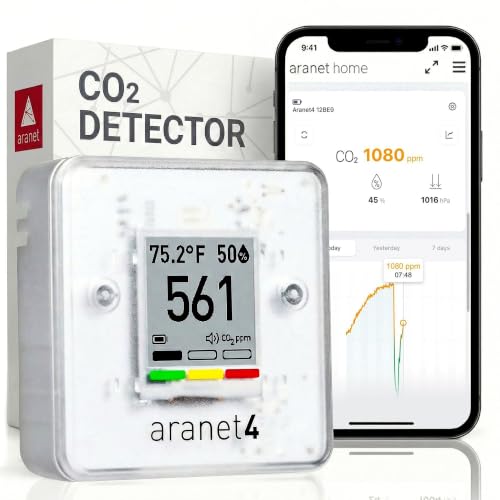
For a meeting room, the pick is the SAF Aranet4. It reports CO2, temperature, humidity and pressure on an e-ink display, runs up to four years on its cells, and logs up to 90 days to an app, so you can look back at a Monday morning meeting and see whether the room cleared between sessions. The Temtop portable CO2 monitor is the alternative if you want a faster refresh and a tighter stated accuracy band in the 400 to 2500 ppm range, which is exactly where a meeting room lives. The Airthings View Plus is the pick if you also want radon and particulate data from the same box, and you accept that it needs WiFi and an account to show you anything at all. The DANOPLUS 0-5000PPM and the Aolidsive Wall Mount are excluded from the picks: the DANOPLUS 0-5000PPM is a greenhouse controller with a relay output, not a room monitor, and the Aolidsive Wall Mount’s listing does not publish a CO2 range or accuracy figure, so it cannot be compared on the numbers that matter here.
Why a meeting room is not just a small office
An open-plan office has a large air volume and a steady, low-density occupancy. A meeting room does the opposite. It has a small volume, a door that is usually shut, and a sudden high density of people who then leave. The CO2 curve in that room is not a slow drift; it is a step. It rises hard for the first 20 minutes, plateaus while people talk, and then falls only as fast as the room’s air change rate allows once the door opens.
That shape changes what you need from a monitor. A slow sensor that averages over several minutes will understate the peak and make a badly ventilated room look acceptable. A sensor with a long logging interval will miss the difference between a 45 minute stand-up and a two hour workshop. And a monitor with no history at all will only ever tell you what the room is doing right now, which is the one moment you are least likely to be in the room to see.
So the specification that matters most here is not the headline CO2 range. It is the response time, the logging depth, and whether the display can be read by somebody sitting at the far end of the table without getting up. The practical guide to monitoring CO2 in meeting rooms covers the placement and threshold questions in more detail; this page is about which of the supplied monitors actually does the job.
What the listing numbers tell you, and what they leave out
Only two of the five supplied products publish a CO2 accuracy figure. The Temtop portable CO2 monitor states plus or minus 40 ppm plus 5 percent of reading within the 400 to 2500 ppm range, with 1 ppm resolution and a 5 second refresh. The DANOPLUS 0-5000PPM states plus or minus 50 ppm or plus or minus 5 percent over 0 to 5000 ppm, with readings updating every second. The SAF Aranet4, the Airthings View Plus and the Aolidsive Wall Mount do not publish a CO2 accuracy number in their listings, so no comparison of accuracy can be made for those three from the supplied data.
That is worth pausing on, because accuracy is the number buyers reach for first. In a meeting room it is usually the least important of the three. A monitor that is 40 ppm out but refreshes in 5 seconds will show you the peak of a meeting correctly. A monitor that is 5 ppm out but averages over two minutes will show you a smoothed number that never reaches the peak. The peak is the thing you are trying to control.
Resolution is the other number that gets confused with accuracy. The Temtop portable CO2 monitor’s 1 ppm resolution does not mean the reading is good to 1 ppm; it means the display increments in steps of 1 ppm. A consumer NDIR sensor claiming sub-ppm accuracy would be a claim worth questioning, but nobody here is making one. The stated accuracy bands are broad enough to be plausible for the technology.
What almost none of these listings publish is the calibration interval or the drift specification. NDIR sensors do drift, and the usual remedy is a baseline calibration in fresh air, done when the room is empty and has been ventilated. The Aolidsive Wall Mount’s listing mentions automatic and manual calibration options; the others do not describe a calibration procedure at all. Treat that as a gap you will have to fill from the manual, not as evidence that calibration is unnecessary.
The comparison table, using only what the listings publish
| Monitor | Stated CO2 range | Stated CO2 accuracy | Refresh or sampling | Power | History | Alarm |
|---|---|---|---|---|---|---|
| SAF Aranet4 | Not stated in the listing bullets | Not stated in the listing bullets | Not stated in the listing bullets | Up to 4 years on cells | Up to 90 days in app | Optional buzzer |
| Temtop | 400 to 5000 ppm | Plus or minus 40 ppm plus 5 percent of reading, 400 to 2500 ppm | 5 second refresh, 1 ppm resolution | 70 day standby | Not stated in the listing bullets | Smart alert system |
| Airthings View Plus | Not stated in the listing bullets | Not stated in the listing bullets | Not stated in the listing bullets | Battery powered, WiFi connected | Cloud stored, live data in app | Air quality notifications |
The table is deliberately sparse. Three of the five supplied products do not publish the CO2 figures that would let them be ranked on measurement performance, and two of those three are not meeting room monitors in the first place. The DANOPLUS 0-5000PPM’s one-second update and 15 foot probe belong to a greenhouse controller with a relay output, and the Aolidsive Wall Mount’s listing gives a temperature range and a humidity range but no CO2 range or accuracy at all, so there is nothing to put in the CO2 columns.
What the table does show is a real trade. The SAF Aranet4 gives you the longest battery and the deepest history but publishes no sensor figures. The Temtop portable CO2 monitor gives you the most sensor detail but does not state a history depth. The Airthings View Plus gives you the widest parameter set but ties everything to WiFi and an account. None of them wins every column, which is why the answer depends on which failure mode you care about.
The three monitors worth putting on a meeting room wall
SAF Aranet4
The default meeting room monitor: e-ink display readable from across the table, up to four years of battery, 90 days of app history, and an optional buzzer for when the room passes your threshold.
Temtop portable CO2 monitor
The tightest stated accuracy band in the set inside the 400 to 2500 ppm window, with a 5 second refresh and a 70 day standby figure, for people who want the number to move quickly.
Airthings View Plus
The multi-parameter option: radon, PM2.5, VOC, CO2, humidity, temperature and pressure in one mains-free box, at the cost of requiring WiFi, an account and the cloud.
Battery, logging and the meeting room you never see
The meeting room problem is that the monitor is most useful when nobody is looking at it. You want to know what happened during the 9am stand-up, and you are not in the room at 9.45 when the number peaked. That makes logging and battery life the two specifications that decide whether the monitor is still doing its job in six months.
The SAF Aranet4’s listing states up to four years of battery life from its cells and up to 90 days of historical data in the app. For a room that is used several times a day, that combination means you can leave the monitor on the wall, forget it, and still pull up last month’s meetings when somebody complains the room feels stuffy. The e-ink display is the reason the battery lasts; it draws power only when the image changes, which is why the number on screen stays visible even when the device is between updates.
The Temtop portable CO2 monitor’s listing states a 70 day standby figure and a 5 second refresh. Those two numbers pull in opposite directions: a fast refresh costs power, so the 70 day figure is a standby claim rather than a continuous-logging claim. If you plan to leave it running in a room that is used all day, expect to recharge more often than the headline suggests, and note that the listing does not state how much history the device retains.
The Airthings View Plus is the outlier. It is battery powered but WiFi connected, and the listing states that the monitor and app both require internet access, with data saved in the cloud. That is fine in a building with reliable WiFi and a policy that allows it. It is a problem in a room where the WiFi drops, because the listing does not describe any local buffering. The comparison of monitors with exportable CO2 data is the place to look if you need to get the numbers out of the vendor’s cloud and into your own records.
Where these monitors stop being the right answer for a meeting room
A CO2 monitor tells you the concentration in the air around its sensor. It does not tell you the air change rate, it does not tell you whether the ventilation is delivering the air it is supposed to, and it does not control anything. If your building has a mechanical ventilation system with a known design rate, a CO2 monitor is a check on that system, not a substitute for commissioning it.
The DANOPLUS 0-5000PPM is the clearest example of a product that does something different. Its listing describes a controller with a relay output, a photocell that pauses a CO2 generator at night, and plant and human modes. That is a device for driving equipment, and it is aimed at greenhouses and grow rooms. Putting it in a meeting room would give you a display and an alarm, but the relay and the day and night logic would be unused, and the listing does not present it as a room monitor. It belongs on the greenhouse controller page, not here.
The Aolidsive Wall Mount is a wall-mounted three-in-one unit with an NDIR sensor and colour coded alerts, but its listing publishes a temperature range and a humidity range and no CO2 range or accuracy figure. Without those numbers you cannot say whether it will read correctly at 2500 ppm, which is where a full meeting room sits. It may well be fine; the listing simply does not say.
Finally, none of these is a safety device. A CO2 monitor is not a combustible gas detector, not a carbon monoxide alarm, and not a substitute for either. If the meeting room shares a plant room or a kitchen, the CO2 number is not the number that protects anybody.
Choosing between the three, in one paragraph each
Choose the SAF Aranet4 if you want the monitor to disappear onto the wall and stay useful. Four years of battery and 90 days of history are the two figures that make it work in a room nobody supervises, and the e-ink display means the number is legible from the doorway without waking the device. The listing does not publish a CO2 accuracy or refresh figure, so you are trusting the sensor class rather than a stated number.
Choose the Temtop portable CO2 monitor if you want the sensor behaviour described in the listing. A 5 second refresh and a stated accuracy band covering 400 to 2500 ppm is the most transparent specification in the set for meeting room concentrations, and the 1 ppm resolution makes small changes visible. The trade is that the listing does not state a history depth, so long-term review is less certain.
Choose the Airthings View Plus if the meeting room is part of a wider air quality question and you want radon, PM2.5 and VOC from the same device. It is the only pick here that measures radon, and the listing states it requires WiFi, an account and cloud storage to function. In a room with dependable network access and a need for more than CO2, that is a reasonable trade. In a room without it, the device is a display with nothing to show.
Recommended Tools


Products shown because their documented specifications fit this guide. Price and availability are on Amazon and can change.
Frequently Asked Questions
What CO2 level should trigger action in a meeting room?
The listings do not set a threshold, and none of these devices is a regulatory instrument. The common working figure in ventilation guidance is that outdoor air is around 420 ppm and that a well-ventilated occupied space should stay within a few hundred ppm of that. In practice, most people set the alarm on these monitors somewhere between 800 and 1000 ppm and treat it as a prompt to open a door or boost the ventilation, not as a hard limit.
Does the monitor need to be calibrated, and how often?
NDIR sensors drift, and the usual correction is a baseline calibration in fresh air with the room empty and ventilated. The Aolidsive Wall Mount's listing mentions automatic and manual calibration options. The other listings do not describe a calibration procedure or state a recommended interval, so you will need to follow the manual that comes with the unit. Treat an uncalibrated monitor as a trend indicator rather than an absolute reference.
Can I use the greenhouse controller, the DANOPLUS 0-5000PPM, in a meeting room?
It will display CO2 and sound an alarm, but its listing describes a device built to drive equipment: a relay output, plant and human modes, and a photocell that pauses a CO2 generator at night. Those functions have no role in a meeting room, and the listing does not present it as a room monitor. It is a controller, and it belongs with the greenhouse equipment.
Why is the Aolidsive Wall Mount not in the picks?
Its listing publishes a temperature range of 14 to 122 F and a humidity range of 20 to 85 percent, but no CO2 range and no CO2 accuracy figure. Without those numbers there is no way to compare it with the other monitors on the measurement that matters for a meeting room. It may perform well; the listing simply does not publish the figures.
Do I need the app, or can I just read the display?
the SAF Aranet4 and the Temtop portable CO2 monitor both show the CO2 number on the device. The Airthings View Plus's listing states that the monitor requires the Airthings app to function, and that the monitor and app both require internet access, with data stored in the cloud. If you want a standalone display with no account and no network, the Airthings View Plus is not that device.
Is a CO2 monitor a substitute for a carbon monoxide alarm?
No. Carbon dioxide and carbon monoxide are different gases with different sensors. None of the monitors here is a CO alarm, and none should be treated as one. A meeting room near a boiler or a car park still needs its own CO alarm, and a CO2 reading tells you nothing about it.
Affiliate disclosure: Akermin earns a commission from qualifying Amazon purchases made through links on this page. Our editorial picks are based on documented specifications and owner feedback, not commissions.