As an Amazon Associate, Akermin earns from qualifying purchases. Product links on this page are affiliate links.
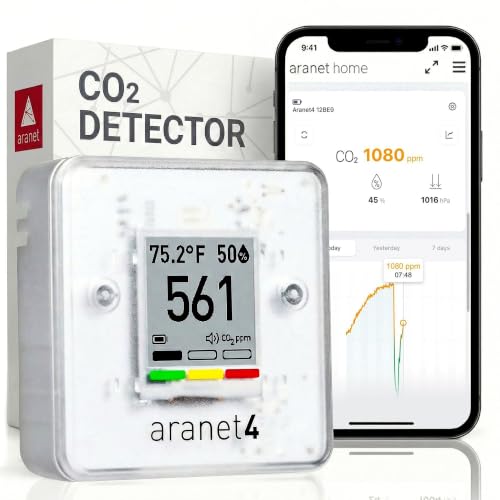
For an open-plan office the practical pick is the SAF Aranet4 because its e-ink display stays readable from a neighbouring desk and the listing states up to four years of battery life, so it can be left on a shared surface without a cable run or a charging rota. The Airthings 2960 View Plus is the one to choose if the office also needs radon, PM2.5 and VOC coverage and you accept that it requires mains-free placement plus WiFi and an account. The INKBIRD IAM-T2 is the value route for a single desk, with a stated 3000 mAh battery and Bluetooth range of up to 100 metres, but its readings live on your phone rather than in a shared view.
Why an open-plan office breaks the usual CO2 advice
In a bedroom the question is simple: did one person’s breathing push the room past about 1000 ppm overnight. In an open-plan office the same sensor sits in a volume that is being breathed into by thirty people, fed by a mechanical system that may or may not be delivering the design outdoor air rate, and disturbed every time a door opens. The number on the screen is a local concentration, not a room average. A monitor on the far side of a partition can read several hundred ppm lower than one beside a cluster of desks.
That has two consequences. First, placement is the specification that matters most, and no listing can tell you where to put it. Second, the useful comparison is between a reading now and the same reading at the same spot an hour ago, which is why logging and historical graphs matter more here than in a bedroom. Pages such as CO2 monitors with historical graphs cover that data side in more depth.
Open-plan offices also run long days. A monitor that needs charging every week will be unplugged and forgotten. A monitor that needs a phone within Bluetooth range will be read by one person. A monitor with a large always-on display gets read by whoever walks past it, which is the behaviour you actually want.
What the listing numbers mean before you put one on a desk
Every CO2 figure quoted by these manufacturers is in parts per million, ppm. Outdoor air sits around 400 to 450 ppm in most cities. A well-ventilated meeting room can hold 600 to 800 ppm. Above roughly 1000 ppm, cognitive and comfort effects become the usual reason people start opening windows, and the exact threshold is debated, so treat it as a prompt rather than a medical line.
Two different numbers get quoted and they are not the same thing. Accuracy is how close the reading is to the true concentration. Resolution is the smallest step the display can show. The INKBIRD WiFi NDIR Monitor states an accuracy of up to plus or minus 5 percent over 400 to 5000 ppm, which is a real accuracy claim. A consumer unit claiming 0.5 percent accuracy would be more likely quoting display resolution, because NDIR sensors at this price point do not hold that tolerance. If you see a very tight figure, ask which of the two it describes.
Sensor type matters as well. NDIR, non-dispersive infrared, is the standard method for CO2 because it measures the gas directly by absorption. Electrochemical cells are used for other gases, and the Airthings 2960 View Plus’s listing states an electrochemical sensor type while also claiming CO2 measurement, which is worth reading carefully rather than assuming. The listing is the only source we have, so we report it as stated.
The five monitors, and which desk each one suits
SAF Aranet4
The e-ink screen and stated four-year battery life make it the easiest monitor to leave on a shared desk and read at a glance, with a 90-day app history for checking whether a room is consistently stuffy.
Airthings 2960 View Plus
The only pick here that also covers radon, PM2.5 and VOCs, which matters if the office is in a basement or ground floor, but it depends on WiFi, the app and an account for every reading.
INKBIRD WiFi NDIR Monitor
A mains-powered WiFi unit with a stated NDIR accuracy of plus or minus 5 percent across 400 to 5000 ppm and an audible alarm above 1500 ppm, suited to a fixed location near a power point.
INKBIRDPLUS NDIR Monitor
Battery powered with a stated 200-second manual calibration routine in open air, which suits an office where you want to move the unit between rooms and reset it yourself.
INKBIRD IAM-T2
A 3000 mAh battery stated to run more than six months per charge and Bluetooth 5.0 to a phone, so a single desk can be monitored without any network setup.
Comparison table, built only from what the listings publish
| Pick | Measured | CO2 accuracy | Power and connectivity | Alarm |
|---|---|---|---|---|
| SAF Aranet4 | CO2, temperature, relative humidity, atmospheric pressure | Not stated in the listing bullets | E-ink display, stated battery life up to 4 years, app with up to 90 days of history | Optional buzzer plus colour coding |
| Airthings 2960 View Plus | Radon, PM2.5, CO2, VOCs, humidity, temperature, pressure | Not stated in the listing bullets | Battery powered, WiFi, app and account required, cloud storage | Air quality notifications via app |
| INKBIRD WiFi NDIR | CO2, temperature, humidity | Up to plus or minus 5 percent, 400 to 5000 ppm | WiFi, LCD screen, manual first-use calibration recommended | Sound above 1500 ppm, adjustable |
| INKBIRDPLUS NDIR | CO2, temperature, humidity | Not stated in the listing bullets | Battery powered, USB recharging, LED screen | Alarm when above a customised safe value |
| INKBIRD IAM-T2 | CO2, temperature, humidity | Not stated in the listing bullets | 3000 mAh battery, stated over 6 months per charge, Bluetooth 5.0 | Sound and indicator light, green, yellow, red |
Two things stand out. Only the INKBIRD WiFi NDIR Monitor publishes a CO2 accuracy figure at all, so for the other four you are comparing features rather than metrological claims. And only the Airthings 2960 View Plus covers radon, which is a different measurement problem from CO2 and would normally be handled by a dedicated instrument, as covered in radon monitors for multi-floor homes.
Placement, calibration and the habits that make the number useful
A CO2 monitor measures the air that reaches its sensor. Put it on a shelf behind a monitor and it reads the air in that pocket. Put it on the reception desk beside an open door and it reads something closer to outdoor air. The useful position in an open-plan office is at seated head height, away from windows, doors and air supply diffusers, and in the zone where people actually sit. Once you choose a spot, leave the monitor there. A device that moves between rooms gives you a set of readings you cannot compare.
Calibration is the second habit. NDIR sensors drift slowly, and both INKBIRD WiFi NDIR Monitor and the INKBIRDPLUS NDIR Monitor ask for a manual baseline routine: the INKBIRD WiFi NDIR Monitor recommends placing the unit in an open, uninhabited environment and calibrating once before first use, and the INKBIRDPLUS NDIR Monitor describes pressing three buttons in an open environment and letting it stand for 200 seconds. That routine assumes the air around it is close to outdoor background, which is true on a quiet morning with the windows open and false in a sealed office at lunchtime. Do the calibration when the building is genuinely flushed, or not at all.
Finally, decide what the alarm is for. The INKBIRD WiFi NDIR Monitor and the INKBIRDPLUS NDIR Monitor both use 400 to 700 ppm as normal, 700 to 1500 as warning and 1500 to 5000 as danger, and both let you adjust the trigger. In an office, a 1500 ppm alarm will fire during a full meeting room and be ignored within a week. Set it lower, or use the colour coding on the SAF Aranet4 and the INKBIRD IAM-T2 as a prompt rather than a siren. A monitor is not a ventilation control system; it tells you when to act, and the acting is still opening a window or calling facilities.
Where a desk CO2 monitor stops being the right answer
If the building has a mechanical ventilation system, a single desk monitor cannot tell you whether the system is delivering the design outdoor air rate. It can tell you that the occupied zone is sitting at 1200 ppm, which is evidence that something is wrong, but the diagnosis needs airflow measurement at the diffusers, not another CO2 reading. That is a different instrument class.
If the concern is odour, dust or fumes rather than stuffiness, CO2 is the wrong proxy. Cooking, printing, cleaning products and outdoor smoke all move readings that CO2 alone will miss, and the Airthings 2960 View Plus’s VOC and PM2.5 channels are the only ones here that speak to those. For a workshop or a print room, the particle and VOC side deserves its own instrument; see air quality monitors for offices for how those channels are usually combined.
And if the office is a short-stay rental or a single private room, the open-plan reasoning does not apply and a simpler, cheaper monitor will do. The category is only the right answer when the air volume is shared and the ventilation decision is collective.
Recommended Tools


Products shown because their documented specifications fit this guide. Price and availability are on Amazon and can change.
Frequently Asked Questions
How many CO2 monitors does an open-plan office need?
More than one if the floor is large, because a single sensor reads its own pocket of air. The listings here do not publish a coverage area, so there is no manufacturer figure to work from. A practical approach is one monitor per distinct air zone, meaning per cluster of desks separated by partitions or served by a different supply diffuser, and then compare the readings rather than averaging them.
Is 1000 ppm actually a problem in an office?
It is a widely used prompt level rather than a hard limit. Outdoor air is around 400 to 450 ppm, and 1000 ppm indicates that exhaled air is accumulating faster than fresh air is arriving. The listings here do not make health claims, and the thresholds they do publish are alarm bands, not medical advice. Treat a sustained reading above your chosen level as a signal to improve ventilation.
Which of these can be read without a phone?
the SAF Aranet4 has an e-ink display with a prominent CO2 number and colour coding, the INKBIRD WiFi NDIR Monitor has a bright LCD with large numbers, the INKBIRDPLUS NDIR Monitor has a large LED screen, and the INKBIRD IAM-T2 has a backlit LCD with green, yellow and red indicators. The Airthings 2960 View Plus requires the Airthings app to function, so its readings are phone-first. If the monitor is for a shared desk, a screen that anyone can read matters more than an app.
Do I need WiFi, or is Bluetooth enough?
Bluetooth, as on the INKBIRD IAM-T2, is enough for one person checking one desk within the stated 100 metre unobstructed range. WiFi, as on the Airthings 2960 View Plus and the INKBIRD WiFi NDIR Monitor, is what you need if readings should be visible remotely or stored in the cloud. The Airthings 2960 View Plus additionally requires an account with an email and name, and both the monitor and app need internet access.
Can I use one of these to check whether the HVAC system is working?
Only as an indicator. A CO2 reading shows the result of ventilation in the occupied zone, not the delivered airflow. If the reading is persistently high, the monitor has done its job by showing there is a problem; confirming the cause needs airflow measurement at the supply and extract points, which is a different instrument.
How often do these need calibrating?
The listings do not publish a calibration interval for any of the five. The INKBIRD WiFi NDIR Monitor recommends a single manual calibration before first use in an open, uninhabited environment, and the INKBIRDPLUS NDIR Monitor describes a 200-second routine in open air. For the others, the listing does not publish a procedure, so follow whatever the manufacturer's own documentation states rather than inventing a schedule.
Affiliate disclosure: Akermin earns a commission from qualifying Amazon purchases made through links on this page. Our editorial picks are based on documented specifications and owner feedback, not commissions.