As an Amazon Associate, Akermin earns from qualifying purchases. Product links on this page are affiliate links.
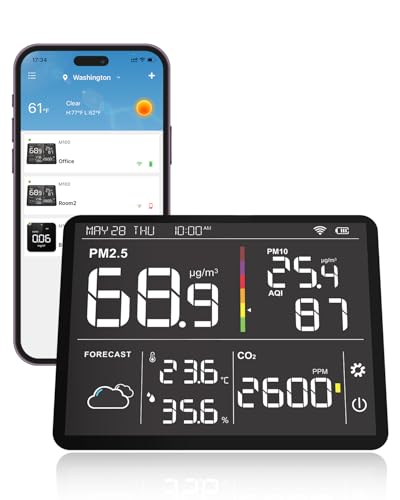
For historical graphs, the pick depends on where you want the record to live. P1 (SAF Aranet4) is the strongest all-rounder: the listing states up to 90 days of history in its app with user-friendly graphs, on an e-ink display with a stated battery life of up to four years. P3 (Temtop M100) is the pick if you want the graph on a large screen in the room rather than on a phone, with a 7-inch touchscreen showing detailed historical trend graphs and support for multiple LoRa sensors. P4 (GZAIR) is the one to choose if you need the raw data out: the listing states built-in logging for up to 7 days with .txt export for PC analysis. P2 (Airthings View Plus) logs continuously to the cloud but is primarily a radon monitor that also measures CO2, and P5 (Temtop weather station) claims trend tracking and historical analysis through its dashboard but publishes no retention period. If a graph is the whole point, check the retention figure before you buy; two of these listings do not give one.
What a history graph actually records, and why retention is the number to check first
A CO2 monitor with a graph is doing two separate jobs. The first is measurement: an NDIR sensor shines infrared light through a chamber and works out how much of it is absorbed by carbon dioxide molecules. The second is memory: sampling that measurement at intervals, storing the samples, and drawing them. The sensor determines whether the number is right. The memory determines whether the graph is useful a week later.
Retention is the specification buyers forget to check, and it is the one that decides what questions the graph can answer. A monitor that keeps 24 hours of history can show you last night’s bedroom peak. A monitor that keeps 90 days can show you whether the new extract fan in the meeting room actually reduced afternoon CO2, or whether the effect faded when the novelty wore off. Those are different instruments in practice, even if the sensor inside is identical.
Among the listings here, only P1 states a retention figure plainly: up to 90 days of historical data in the app, with graphs. P4 states up to 7 days of built-in logging, with adjustable intervals and .txt export. P3 states historical trend graphs on its 7-inch screen and historical analysis in the app, without a retention period. P2 states continuous monitoring with data saved in the cloud for seamless tracking, without a retention period. P5 states that its dashboard tracks trends and analyzes historical data, again without a retention period. Where a listing is silent, treat the figure as unknown rather than generous.
The comparison table, built only from what the listings publish
The table below uses only figures and features the manufacturer listings state. Where a listing does not publish something, the cell says so.
| Pick | CO2 sensor type | History retention stated | How you view the graph | Export stated | Other measurements |
|---|---|---|---|---|---|
| P1 SAF Aranet4 | Not stated in the listing bullets | Up to 90 days in the app | Smartphone app with graphs; e-ink display for live value | Not stated in the listing bullets | Temperature, relative humidity, atmospheric pressure |
| P2 Airthings View Plus | Not stated in the listing bullets; listing gives sensor type as electrochemical | Not stated in the listing bullets; data saved in the cloud | Airthings app; account and internet access required | Not stated in the listing bullets | Radon, PM2.5, VOCs, humidity, temperature, pressure |
| P3 Temtop M100 2nd Gen | Not stated in the listing bullets | Not stated in the listing bullets; historical trend graphs stated | 7-inch touchscreen in the room and companion app | Not stated in the listing bullets | PM2.5, PM10, TVOC, temperature, humidity, AQI |
| P4 GZAIR Data Logger | Dual-channel NDIR infrared | Up to 7 days built in, adjustable interval | 3.5-inch touchscreen; PC analysis after export | .txt export for PC | Temperature, humidity |
| P5 Temtop 8-in-1 | Not stated in the listing bullets | Not stated in the listing bullets; dashboard analyzes historical data | Touchscreen and Temtop dashboard | Not stated in the listing bullets | PM2.5, PM10, AQI, temperature, humidity, weather forecast, date and time |
Two things stand out. First, only P4 names its CO2 sensing technology as NDIR, which is the standard method for this measurement; the others simply do not say. Second, only P1 and P4 publish a retention figure at all. If the graph is the reason you are buying, those two listings are the only ones where you can check the claim before purchase.
On-device graphs versus app graphs, and the account question
Where the graph appears changes how you use it. P3 puts a 7-inch touchscreen in the room showing historical trend graphs alongside live readings and a weather forecast. That suits a hallway, a classroom or an open-plan office where several people want to glance at the trend without asking for somebody’s phone. P1 and P2 put the graph in an app. That suits one person carrying the record around, and it means the monitor itself can be small and cheap to run.
The app route has a condition attached. P2’s listing states plainly that the monitor requires the Airthings app to function, that an account is required, and that both the monitor and the app need internet access, with data saved in the cloud. That is a genuine dependency: no account, no data, and the device is not a standalone instrument. P1’s listing describes a free and interactive app for viewing up to 90 days of history, but does not state an account requirement. P3’s listing describes a companion mobile app alongside the screen. P4 needs no app at all for its 7 days of logging; the data sits on the device until you export it.
This matters for rentals and shared buildings. A cloud account tied to one email address is awkward to hand over to a tenant or a facilities team, whereas a .txt file on a laptop is not. If you are monitoring a space you do not own, see the guidance on CO2 monitors for short stay rental hosts before committing to an account-based device.
The five monitors, judged on how they keep a record
SAF Aranet4
The listing states up to 90 days of history in the app with user-friendly graphs, on a monitor that runs for years on a coin cell.
Airthings View Plus
Continuous cloud logging and notifications for radon, CO2, PM2.5 and VOCs, but the record lives in an account and the device needs WiFi.
Temtop M100 2nd Gen
A 7-inch touchscreen that shows historical trend graphs in the room, plus multi-room monitoring through separate LoRa sensors.
GZAIR CO2 Monitor with Data Logger
The only pick whose listing states a raw export format: up to 7 days of logging, exported as .txt for PC analysis.
Temtop 8-in-1 Weather Station
Tracks trends and historical data through the Temtop dashboard and supports up to 8 linked sensors, but publishes no retention period.
Export, sampling interval and the difference between a graph and evidence
A graph on a screen is for decisions in the moment. An export is for arguments later: with a landlord, a school business manager, or a ventilation contractor. The two are not the same feature, and only one listing here states an export path. P4 stores up to 7 days of readings at an interval you choose, and exports them as .txt for PC-based analysis. That is a short window but a real one, and the adjustable interval is what makes it useful: sample every minute and you can see a door opening; sample every fifteen minutes and you see the shape of the day.
The other listings describe graphs and trend analysis without naming a file format. That does not mean export is impossible, only that it is not published, and an unpublished capability is not one to plan around. If your purpose is to compare CO2 across rooms or over seasons, the sibling page on air quality monitors with exportable CO2 data covers the format question in more depth.
One more practical point on intervals. A monitor that graphs a single daily average will hide the twenty minutes when a meeting room filled up. A monitor that graphs short samples will show it. None of these listings states its sampling interval except P4, which says the interval is user-adjustable. For the rest, the resolution of the graph is unknown, and a smooth line may be smoothing over the event you care about.
Where a graphing CO2 monitor stops being the right instrument
Historical graphs are a diagnostic tool, not a safety system. None of the five devices here is an alarm, and none should be relied on to wake you. P1’s listing mentions an optional buzzer that alerts when CO2 becomes too high, which is a convenience feature, not a life-safety function. P2 measures radon, which is a genuine health concern, but the listing describes it as a monitor with notifications, not a certified alarm; radon decisions should follow the testing guidance for your region. If you need a device that sounds an alarm at a threshold, buy an alarm.
The second limit is the measurement itself. CO2 is a proxy for exhaled air and therefore for ventilation, not a direct measure of infection risk, dust, or chemical fumes. A room with low CO2 can still be full of formaldehyde from new furniture or PM2.5 from a nearby road. If your concern is particles rather than stale air, a particle monitor is the right instrument; the page on air particle monitors covers that category. P2 and P3 measure PM2.5 as well, which makes them broader instruments, but their CO2 history is still CO2 history.
The third limit is the building. In a leaky old house, CO2 may never rise enough to make a graph interesting. In a sealed modern flat with a single extract fan, the graph is the only way to know whether the fan is doing anything. Buy the monitor when you have a question the graph can answer; do not buy it because graphs look convincing.
Practical notes on placement, calibration and what the listings leave out
Placement decides whether the graph means anything. A CO2 monitor reads the air around it, so a unit on a shelf behind a curtain, next to a radiator, or directly under an air conditioning vent will record the shelf, the radiator or the vent. Put it at breathing height, away from windows and doors, and leave it in one place for long enough that the trend reflects the room rather than your movements. A graphing monitor that gets moved every day produces a graph of your habits.
Calibration is the maintenance nobody mentions. NDIR sensors drift slowly, and most consumer units use a baseline correction that assumes the room sees fresh air at some point, usually overnight. A monitor sealed in a bedroom with the door shut and no ventilation may slowly recalibrate itself to a high baseline and under-read. P5’s listing is the only one that addresses this directly, advising that sensors be placed in a ventilated environment for at least 6 hours before first use or after long storage. Treat that as good practice for all of them, and give any CO2 monitor a regular dose of outdoor-level air.
Finally, note what the listings do not say. None of these five publishes a CO2 accuracy figure in parts per million, an operating humidity range, or a calibration interval. P2 publishes an operating temperature range of 4 to 40 degrees Celsius and a sensor type of electrochemical, which is the kind of detail the others omit. Where a listing is silent, the honest position is that the figure is unknown, and the graph should be read as a trend rather than an absolute reference. For a record you intend to compare across instruments or seasons, that distinction matters, and the broader category page on CO2 monitors sets out the other specifications worth checking.
Recommended Tools
Products shown because their documented specifications fit this guide. Price and availability are on Amazon and can change.
Frequently Asked Questions
Which of these keeps the longest history?
P1 states up to 90 days of historical data in its app, the longest retention published in this batch. P4 states up to 7 days of built-in logging. P2, P3 and P5 describe historical data and trend analysis but do not publish a retention period, so the figure is unknown rather than unlimited.
Can I export the data to a spreadsheet?
Only P4 states an export path: .txt files for PC-based analysis. The other listings describe graphs and dashboards without naming a file format, so do not assume export is available. If export matters, treat the absence of a stated format as a reason to check with the manufacturer before buying.
Do I need an internet connection and an account?
For P2, yes: the listing states the monitor requires the Airthings app, an account, and internet access for both the monitor and the app, with data saved in the cloud. P1, P3, P4 and P5 do not state an account requirement in their listings, and P4's logging works on the device without an app at all.
Is a CO2 monitor with a graph a safety device?
No. None of these is an alarm, and a graph is a diagnostic record, not a warning system. P1 has an optional buzzer for high CO2, which is a convenience. P2 measures radon, which is a health concern, but it is described as a monitor with notifications, not a certified alarm. For life-safety alerts, use a dedicated alarm.
How often should I calibrate it, and how?
None of these listings publishes a calibration interval. P5 advises placing the sensor in a ventilated environment for at least 6 hours before first use or after long storage, which is sensible practice for any NDIR monitor. In normal use, giving the monitor regular access to fresh outdoor-level air supports the baseline correction most consumer units rely on.
Will the graph show a short meeting or just daily averages?
That depends on the sampling and graphing interval, which most of these listings do not publish. P4 is the exception: it states that the logging interval is user-adjustable, so you can choose the resolution. For the others, a smooth line may be hiding short peaks, so check the interval if you need to see brief events.
Affiliate disclosure: Akermin earns a commission from qualifying Amazon purchases made through links on this page. Our editorial picks are based on documented specifications and owner feedback, not commissions.