As an Amazon Associate, Akermin earns from qualifying purchases. Product links on this page are affiliate links.
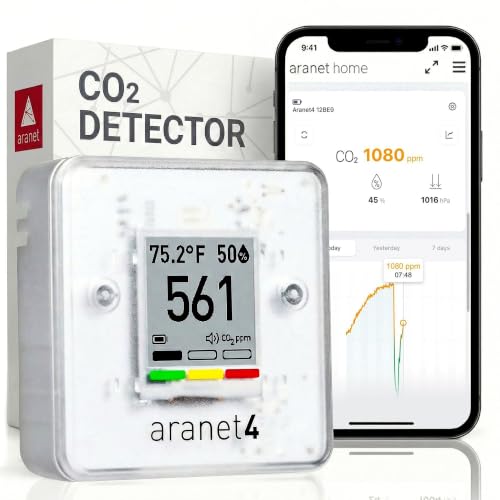
For most short-stay rental hosts the practical pick is the SAF Aranet4. It does one job well: it shows CO2, temperature, humidity, and pressure on an e-ink screen, runs on user-replaceable batteries the listing says last up to four years, and stores up to 90 days of history in a free app. That means you can leave it in the flat, glance at it during a changeover, and hand a guest a device that does not need Wi-Fi, an account, or a charger. If you want to check the rental remotely between guests, the Airthings View Plus (Airthings View Plus) adds Wi-Fi and app notifications but requires mains-free battery power and an account. If you want something cheap to leave on a shelf and check by eye, the Temtop M10+ WiFi (Temtop M10+) or the Dienmern 8-in-1 (Dienmern) cover the basics, though their listings publish less about long-term stability.
Why a rental property is a different monitoring problem
A home has one set of occupants who learn the building’s quirks. A short-stay rental has a new set every few nights, and none of them will tell you the bedroom felt stale. They will simply leave four stars and mention ‘a bit stuffy’ in the review. CO2 is the single best proxy for that experience because it rises directly with occupancy and falls directly with ventilation. A bedroom with the door shut and two adults sleeping can climb past 1500 ppm by morning; the same room with a window cracked can stay under 800 ppm. The monitor does not fix the ventilation. It tells you whether the ventilation you have is working, and it gives you a number to check during a changeover.
That is why the shortlist here looks different from a home-office roundup. You are not choosing a monitor to sit on your own desk and be watched by you. You are choosing something that can be left in a rental, understood by a guest who has never seen it, and ideally checked without a site visit. Battery life matters more than sample rate. A screen that reads clearly from across a room matters more than a tenth of a decimal place. And anything that needs a phone, an account, or a Wi-Fi password to show a number is a liability in a property you do not live in. If your interest is the domestic version of this problem, the bedroom CO2 monitors page covers the same physics without the guest factor.
The comparison table, using only what the listings publish
The table below is assembled strictly from the supplied listing bullets. Where a listing does not state a figure, the cell says so. No values have been estimated, converted from a graph, or inferred from a product photo.
| Pick | Measured parameters (as listed) | Display | Connectivity | Battery (as listed) | Data history (as listed) |
|---|---|---|---|---|---|
| SAF Aranet4 | CO2, temperature, relative humidity, atmospheric pressure | E-ink, colour coded | Bluetooth app (listing does not publish Wi-Fi) | Up to 4 years | Up to 90 days in app |
| Airthings View Plus | Radon, PM2.5, CO2, VOCs, humidity, temperature, pressure | Not stated in the listing bullets | Wi-Fi, app required | Battery powered, duration not stated | Cloud storage, duration not stated |
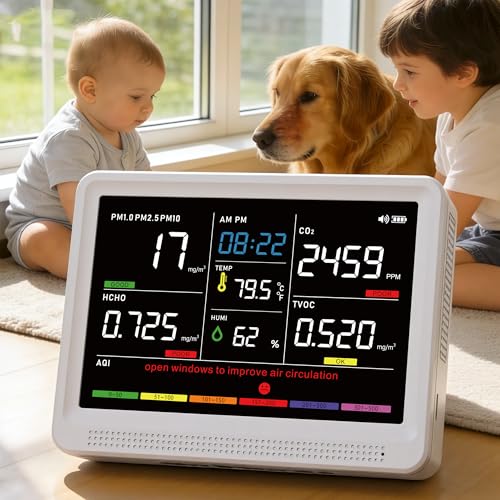
| YNAK 16-in-1 | CO2, PM2.5, PM1.0, PM10, HCHO, TVOC, temperature, humidity, AQI, time | HD screen | Not stated in the listing bullets | 2500mAh, up to 10 hours | Not stated in the listing bullets |
| Temtop M10+ | PM2.5, CO2, TVOC, AQI, temperature, humidity | E-ink, three-colour indicator | Bluetooth and 2.4GHz Wi-Fi | Not stated in the listing bullets | Logging at 1/5/10/30 min, exportable |
| Dienmern 8-in-1 | CO2, AQI, temperature, humidity, HCHO, TVOC | Large HD screen | Not stated in the listing bullets | 1600mAh, up to 72 hours | Not stated in the listing bullets |
The table’s most useful column is the one that says ‘not stated’. The SAF Aranet4 and the Temtop M10+ WiFi publish their logging behaviour; the Airthings View Plus publishes that data goes to the cloud but not for how long; the YNAK 16-in-1 and the Dienmern 8-in-1 publish nothing about history at all. If you want to look back at last weekend’s occupancy, that gap is the deciding factor.
Remote access versus leaving a screen on a shelf
The single biggest fork in this decision is whether you need to see the number without being in the building. A host who lives ten minutes away can walk in during a changeover, read an e-ink screen, and reset the device. A host managing a property in another city cannot. That host needs Wi-Fi and a cloud account, which is exactly what the Airthings View Plus and the Temtop M10+ WiFi provide and what the SAF Aranet4 deliberately avoids.
The trade is not free. A cloud-connected monitor depends on the rental’s Wi-Fi staying up, the account staying active, and the guest not unplugging it to charge a phone. The Airthings View Plus’s listing states plainly that the monitor and app both require internet access, and that an account is required. The SAF Aranet4’s listing states no account and no internet requirement for the device itself; the app is for viewing history. In a rental, fewer dependencies means fewer support calls. If you go the connected route, the Airthings View Plus is the more comprehensive instrument because it also tracks radon and PM2.5, which matters in lower-ground flats and near busy roads. The basement air quality monitors page explains why radon belongs on that list.
There is a middle path: leave a simple screen in the flat for guests and keep a connected unit for your own checks. That is two devices, but it removes the failure mode where a guest unplugs the only monitor you own.
The five monitors, and what each one is actually for
SAF Aranet4
The default choice for a rental: e-ink display, up to four years of battery, no account or Wi-Fi needed, and 90 days of history in a free app. It measures CO2, temperature, humidity, and pressure, which is exactly the set a host needs to answer ‘is this room stuffy?’
Airthings View Plus
The remote-access option. It adds Wi-Fi, cloud logging, and app notifications, plus radon, PM2.5, and VOC sensing. It needs the Airthings app and an account to function, so it suits a host who wants to check the rental without being there.
YNAK 16-in-1
The multi-parameter screen. It reports CO2, PM1.0, PM2.5, PM10, HCHO, TVOC, temperature, humidity, AQI, and time on one display. The listing’s ‘0.001 accuracy’ claim is a resolution figure, not an accuracy figure, and should be read that way.
Temtop M10+ WiFi
The logging-focused midrange pick. It records at 1, 5, 10, or 30 minute intervals, exports data, and shows a three-colour indicator. Wi-Fi and Bluetooth connect it to the Temtop app for remote viewing.
Dienmern 8-in-1
The budget portable. It runs up to 72 hours on a 1600mAh battery, shows CO2, AQI, temperature, humidity, HCHO, and TVOC on a large screen, and is the easiest to move between rooms during a deep clean.
What the accuracy claims in these listings really mean
Two listings here make numerical claims that deserve translation. The YNAK 16-in-1 states ‘high-precision sensors with 0.001 accuracy’. A CO2 reading of 0.001 units is a display resolution, not an accuracy specification. No consumer NDIR CO2 sensor holds a tolerance that tight across its range; the listing is describing how many decimal places the screen can show. Read it as a resolution claim and nothing more. The Airthings View Plus’s listing states the sensor type as electrochemical, which is a family used for gases such as radon and VOCs rather than for CO2 itself; the listing does not break down which sensor type applies to which parameter, so treat the whole unit as a multi-sensor package rather than assuming one technology covers all seven readings.
The Dienmern 8-in-1 claims readings ‘every second’ and the Temtop M10+ WiFi claims logging intervals of 1, 5, 10, or 30 minutes. Those are update rates, not accuracy figures. A fast update rate is useful for spotting a spike when a window opens; it says nothing about whether the absolute number is right. For rental work, the absolute number matters less than the trend: does CO2 fall when the extract fan runs? Does it climb overnight? A monitor that is consistently 50 ppm off will still answer both questions. This is the same logic that applies to reviewing local CO2 data over time rather than trusting a single reading.
Placement, guests, and the maintenance nobody mentions
Where you put the monitor decides what it measures. CO2 is exhaled, so a monitor on a bedside table reads the breathing zone and will show the highest overnight number. A monitor on a hallway shelf reads a mix and will look better than the bedroom actually is. For a rental, the honest placement is the room where guests sleep, at roughly head height when sitting or lying, away from windows, doors, and the extract vent. Do not put it in a cupboard or behind a curtain to keep it tidy; you will be measuring the cupboard.
Maintenance is where these devices quietly fail. NDIR CO2 sensors drift over time and most consumer units rely on automatic baseline calibration, which assumes the room sees fresh air regularly. A rental that is sealed up between guests, with windows shut and no occupancy, can push that baseline in the wrong direction. The practical routine is to air the property thoroughly during each changeover and let the monitor see a low reading, which most algorithms use as their reference. The SAF Aranet4’s listing notes a colour-coded display and an optional buzzer; if you enable the buzzer, expect a guest to ask about it, so either explain it in the welcome book or leave it off. The YNAK 16-in-1’s listing warns against touching the sensors or exposing them to perfume and strong odours, which is a real risk in a rental where guests use air freshener. None of these listings publishes a calibration interval, so plan on checking against outdoor air periodically and replacing the unit if it stops tracking.
Where a CO2 monitor stops being the right answer for a rental
A CO2 monitor tells you about ventilation and occupancy. It does not tell you about carbon monoxide, smoke, or a gas leak, and it is not a substitute for the alarms your insurer and local regulations require. If your rental has a fuel-burning appliance, the CO2 reading is irrelevant to that risk. Likewise, a CO2 number cannot tell you whether a damp patch is rising or whether the extract fan is actually extracting; you need a humidity reading and, ideally, an airflow check for that.
There is also a limit to what monitoring can achieve without action. If your rental has single-glazed sash windows that guests will not open in winter, a monitor will document the problem rather than solve it. In that case the money is better spent on trickle vents, a mechanical extract fan with a humidity sensor, or a positive input ventilation unit. A monitor earns its place once you have some control over ventilation and want to verify it works. If you are monitoring a workspace rather than a rental, the same instruments appear on the home and office CO2 monitors page with a different set of priorities.
Frequently asked questions from hosts
Do I need Wi-Fi in the rental for a CO2 monitor to work? Not for the SAF Aranet4, the YNAK 16-in-1, or the Dienmern 8-in-1, whose listings describe standalone operation with an on-device display. The Airthings View Plus and the Temtop M10+ WiFi require connectivity for their app features; the Airthings View Plus’s listing states the monitor and app both require internet access, and that an account is required.
Can I leave a monitor in the property between guests? Yes, provided it does not need charging. The SAF Aranet4’s listing claims up to four years on its batteries, which makes it the least demanding to leave unattended. The YNAK 16-in-1 and the Dienmern 8-in-1 list 10-hour and 72-hour battery lives respectively, so they need regular charging and are better suited to spot checks during changeovers.
Will the monitor alarm and disturb guests? the SAF Aranet4 has an optional buzzer, the YNAK 16-in-1 has seven AQI alert buzzers with a mute button, and the Temtop M10+ WiFi has an audible buzzer alarm. All can be silenced or disabled; decide before you hand over the keys whether you want guests alerted or just want the data.
Is a CO2 reading enough to prove the rental is well ventilated? No. It proves CO2 is being cleared, which is a good proxy for general air exchange, but it says nothing about moisture, mould, or specific pollutants. The Airthings View Plus and the Temtop M10+ WiFi add particulate and VOC sensing, which broadens the picture.
What is a reasonable CO2 target for a rental bedroom? The listings do not publish target thresholds, and there is no single legal number for domestic rentals in the supplied data. As a working guide, keeping overnight bedroom readings below about 1000 ppm is a common aim, and below 800 ppm is better. Treat those as goals, not as figures from these listings.
How often should I check the monitor? During every changeover is realistic. Look at the overnight peak from the previous stay if the unit logs history; the SAF Aranet4 stores up to 90 days and the Temtop M10+ WiFi logs at set intervals. If the peak is climbing stay after stay, the ventilation needs attention, not the monitor.
Recommended Tools



Products shown because their documented specifications fit this guide. Price and availability are on Amazon and can change.
Frequently Asked Questions
Do I need Wi-Fi in the rental for a CO2 monitor to work?
Not for the SAF Aranet4, the YNAK 16-in-1, or the Dienmern 8-in-1, whose listings describe standalone operation with an on-device display. The Airthings View Plus and the Temtop M10+ WiFi require connectivity for their app features; the Airthings View Plus's listing states the monitor and app both require internet access, and that an account is required.
Can I leave a monitor in the property between guests?
Yes, provided it does not need charging. The SAF Aranet4's listing claims up to four years on its batteries, which makes it the least demanding to leave unattended. The YNAK 16-in-1 and the Dienmern 8-in-1 list 10-hour and 72-hour battery lives respectively, so they need regular charging and are better suited to spot checks during changeovers.
Will the monitor alarm and disturb guests?
the SAF Aranet4 has an optional buzzer, the YNAK 16-in-1 has seven AQI alert buzzers with a mute button, and the Temtop M10+ WiFi has an audible buzzer alarm. All can be silenced or disabled; decide before you hand over the keys whether you want guests alerted or just want the data.
Is a CO2 reading enough to prove the rental is well ventilated?
No. It proves CO2 is being cleared, which is a good proxy for general air exchange, but it says nothing about moisture, mould, or specific pollutants. The Airthings View Plus and the Temtop M10+ WiFi add particulate and VOC sensing, which broadens the picture.
What is a reasonable CO2 target for a rental bedroom?
The listings do not publish target thresholds, and there is no single legal number for domestic rentals in the supplied data. As a working guide, keeping overnight bedroom readings below about 1000 ppm is a common aim, and below 800 ppm is better. Treat those as goals, not as figures from these listings.
How often should I check the monitor?
During every changeover is realistic. Look at the overnight peak from the previous stay if the unit logs history; the SAF Aranet4 stores up to 90 days and the Temtop M10+ WiFi logs at set intervals. If the peak is climbing stay after stay, the ventilation needs attention, not the monitor.
Affiliate disclosure: Akermin earns a commission from qualifying Amazon purchases made through links on this page. Our editorial picks are based on documented specifications and owner feedback, not commissions.