As an Amazon Associate, Akermin earns from qualifying purchases. Product links on this page are affiliate links.
The pick depends on whether you want a self-contained instrument or a phone accessory. The FLIR E8 Pro is the strongest choice for sustained inspection work: it is a handheld camera with a stated measurement range of -20 to 550 C, a 320 x 240 native sensor and MSX, and its battery is the kind you can carry a spare for. The FLIR One for iOS USB-C is the value alternative at 160 x 120, and the FLIR One Pro for Android USB-C is the highest-resolution phone module here at 480 x 360 upscaled from 160 x 120. The FLIR E5-XT is the iPhone option, limited to 240 x 180 upscaled from 80 x 60. If your work runs longer than a single charge, the handhelds are the safer purchase because a phone module drains the phone it is plugged into.
Why a replaceable battery is a workflow decision, not a spec sheet line
Most thermal camera reviews talk about pixels. This page is about the thing that stops you working at four in the afternoon. A camera with a sealed cell is a camera you schedule around. A camera with a swappable cell is a camera you keep using until the job is done.
The four products here split into two power philosophies. The FLIR E8 Pro and the FLIR One for iOS USB-C are handheld instruments with their own grip and display. The FLIR E5-XT and the FLIR One Pro for Android USB-C are modules that plug into a phone and draw from the phone’s battery. That difference matters more than any single specification on the page. A handheld with a spare cell in your bag can run through a full day of panel-by-panel inspection. A phone module cannot, because when the module is working it is also flattening the device you need for calls, photos and the inspection app itself.
There is a second consequence. Phones get replaced. A module keyed to a specific connector and operating system has a working life tied to the phone it fits. The FLIR E5-XT is listed for iPhone 15 and newer with USB-C. The FLIR One Pro for Android USB-C is listed for USB-C Android devices. Neither will follow you to a phone with a different port without a new purchase. A handheld does not have that problem.
The numbers that decide whether the camera sees your fault
Thermal resolution is stated two ways in these listings, and the difference is not cosmetic. Native resolution is the number of detector pixels actually reading heat. Super resolution or Vivid IR is an upscaling process that produces a larger output image from a smaller native array.
| Product | Native IR | Output resolution | Stated temperature range | Stated accuracy | Power arrangement |
|---|---|---|---|---|---|
| FLIR E8 Pro | 320 x 240 (76,800 pixels) | 320 x 240 with MSX | -20 to 550 C | Not stated in the listing bullets | Handheld, replaceable cell |
| FLIR One for iOS USB-C | 160 x 120 (19,200 pixels) | 160 x 120 with MSX | -20 to 400 C | Not stated in the listing bullets | Handheld, replaceable cell |
| FLIR One Pro for Android USB-C | 160 x 120 | 480 x 360 upscaled | Not stated in the listing bullets | plus or minus 3 C or 5 percent, 15 to 35 C ambient, 5 to 120 C scene | Phone module, phone battery |
| FLIR E5-XT | 80 x 60 | 240 x 180 upscaled | Not stated in the listing bullets | plus or minus 3 C or 5 percent, 15 to 35 C ambient, 5 to 120 C scene | Phone module, phone battery |
The practical rule: a small fault at distance needs native pixels. A 160 x 120 sensor has 19,200 detectors. Point it at a wall from across a room and each detector covers a patch of surface. A loose connection on a busbar is smaller than that patch, so the camera averages it with the surrounding metal and the hot spot fades. The FLIR E8 Pro’s 320 x 240 array halves the patch size and makes the same fault visible from the same distance. The FLIR One Pro for Android USB-C’s upscaled 480 x 360 image is sharper to look at, but the underlying 160 x 120 array still sets what can be resolved. Upscaling interpolates between real measurements; it does not create them.
MSX, listed on the FLIR E8 Pro, the FLIR E5-XT, the FLIR One Pro for Android USB-C and the FLIR One for iOS USB-C, embosses visible-light edges onto the thermal image. It helps you describe what you are looking at, and it helps a client see the fault. It does not improve the temperature measurement.
The four cameras, and what each one is actually for
FLIR E8 Pro
The only pick here that combines a 320 x 240 native sensor, a stated range to 550 C and a body large enough to carry a spare cell. For electrical and mechanical inspection where you are moving between panels and plant all day, this is the one that keeps working.
FLIR E5-XT
The value handheld. Same body format and cloud workflow as the FLIR E8 Pro, but 160 x 120 native resolution and a stated ceiling of 400 C. If your targets are large, such as a wall, a duct run or a distribution board seen from a step back, the lower pixel count costs you less than the price difference suggests.
FLIR One Pro for Android USB-C
The highest-resolution phone module in this group at 480 x 360 upscaled from 160 x 120. It suits an Android user who wants a camera that lives in a pocket and is charged alongside the phone, not instead of it.
FLIR One for iOS USB-C
The iPhone 15 and newer option. 240 x 180 upscaled from 80 x 60 native, which is the lowest true pixel count here. Buy it for occasional home checks, not for small-component work.
Accuracy, range and the conditions the listing attaches to them
The FLIR E5-XT and the FLIR One Pro for Android USB-C publish an accuracy figure: plus or minus 3 C or 5 percent, whichever is greater, valid when the unit is within 15 to 35 C and the scene is between 5 and 120 C. Read that as a set of conditions, not a blanket promise. Step outside the ambient band, or point at something hotter than 120 C, and the listing no longer supports the figure. That is normal for an uncooled microbolometer, but it matters if you plan to use the camera in a cold loft or on a hot roof.
The FLIR E8 Pro and the FLIR One for iOS USB-C do not publish an accuracy figure in their bullets. The listings give a measurement range instead: -20 to 550 C for the FLIR E8 Pro and -20 to 400 C for the FLIR One for iOS USB-C. A range is not an accuracy. A camera can measure to 550 C and still be wrong by several degrees at that temperature. If absolute temperature matters to your work, ask the manufacturer for the accuracy specification before buying, because it is not on the page.
The range difference is real, though. The FLIR E8 Pro reaches 550 C and the FLIR One for iOS USB-C stops at 400 C. For electrical work, most overloaded connections sit well below 400 C, so the FLIR One for iOS USB-C’s ceiling is often enough. For process work, a furnace flue or an exhaust manifold, the FLIR E8 Pro’s higher ceiling is the reason to choose it.
Cloud workflow, apps and the maintenance nobody puts on the box
The FLIR E8 Pro and the FLIR One for iOS USB-C both list FLIR Ignite Cloud: images are stored, edited and shared through the app, and over-the-air updates keep the camera firmware current. The FLIR E5-XT and the FLIR One Pro for Android USB-C use the FLIR One app, which includes step-by-step inspection guides for common faults such as air leaks and moisture. Those guides are genuinely useful if you are new to thermal inspection, because they tell you what to point the camera at and in what order.
The maintenance nobody mentions is battery behaviour. A lithium cell that lives in a camera and is charged after every job loses capacity over time. A camera with a swappable cell lets you keep two and rotate them, so the camera is never the limiting item. The same logic applies to phone modules in reverse: the phone’s battery ages, and a module that draws from it accelerates that ageing.
If you are comparing handhelds specifically, the resolution question is covered in more depth in high-resolution thermal cameras, and the workflow side in thermal cameras with WiFi. Both are worth reading before you commit to a pixel count.
Where these cameras stop being the right answer
None of these four is a substitute for a contact thermometer when you need a defensible absolute number. Thermal cameras infer temperature from emitted infrared, which depends on emissivity. Shiny metal, glass and polished pipe all read low because they reflect rather than emit. If you need to prove a surface is at a specific temperature, you need a contact probe or a camera with emissivity correction set properly for the material.
None of them is a gas detector. A thermal camera can show a temperature difference, not a concentration. It cannot tell you whether a space is safe to enter.
And none of them is the right tool for a one-off check of a single wall. If you are buying to look at one draught or one radiator, the phone modules are the only sensible spend, and even then you may be better off with a cheap thermal camera you can resell. The handhelds are for people who will use the camera repeatedly and need it to survive a working day. If that is you, the replaceable battery is the feature that keeps the camera in your hand rather than on a charger.
Recommended Tools


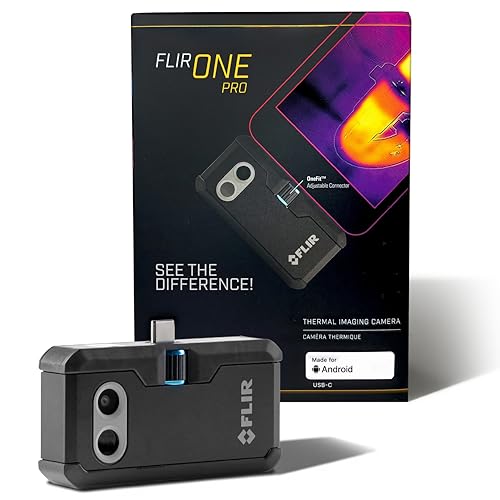

Products shown because their documented specifications fit this guide. Price and availability are on Amazon and can change.
Frequently Asked Questions
Do these cameras actually have replaceable batteries?
The handhelds, the FLIR E8 Pro and the FLIR One for iOS USB-C, are described as handheld instruments with their own body and display, which is the format that takes a swappable cell. The listings do not state the battery type or whether a spare is included, so confirm that with the seller. The FLIR E5-XT and the FLIR One Pro for Android USB-C are phone modules and draw power from the phone, so there is no camera battery to replace.
Is a phone module a bad choice if I need to work all day?
It is a compromise. The module drains the phone it is plugged into, so your working time is the phone's battery life minus whatever else you are doing with it. A handheld with a spare cell does not have that limit. If your inspections are short and occasional, the module is fine. If they are long and repeated, the handheld is the better purchase.
Which pick has the best resolution?
the FLIR E8 Pro has the highest native resolution at 320 x 240. The FLIR One Pro for Android USB-C produces the largest output image at 480 x 360, but that is upscaled from a 160 x 120 native array, so it carries less real measurement detail than the FLIR E8 Pro. For finding small faults at distance, native pixels matter more than the output number.
Can I use the FLIR E5-XT or the FLIR One Pro for Android USB-C to measure something hotter than 120 C?
The listings only support the stated accuracy of plus or minus 3 C or 5 percent when the scene is between 5 and 120 C. Above that, the accuracy figure does not apply. If you need to measure hot equipment, the FLIR E8 Pro reaches 550 C and the FLIR One for iOS USB-C reaches 400 C, though neither listing publishes an accuracy figure for those ranges.
Do I need the cloud features?
Not for the measurement itself. FLIR Ignite on the FLIR E8 Pro and the FLIR One for iOS USB-C is about storing, editing and sharing images, and receiving firmware updates. The inspection guides in the FLIR One app on the FLIR E5-XT and the FLIR One Pro for Android USB-C are more directly useful to a beginner, because they walk through common faults. If you already have a reporting workflow, the cloud may save you time; if not, it is a convenience rather than a requirement.
What is the biggest mistake buyers make with these cameras?
Buying on output resolution rather than native resolution, and assuming a camera with a swappable cell comes with a spare. Check what is in the box. A replaceable battery only helps if you own a second one and keep it charged.
Affiliate disclosure: Akermin earns a commission from qualifying Amazon purchases made through links on this page. Our editorial picks are based on documented specifications and owner feedback, not commissions.