As an Amazon Associate, Akermin earns from qualifying purchases. Product links on this page are affiliate links.
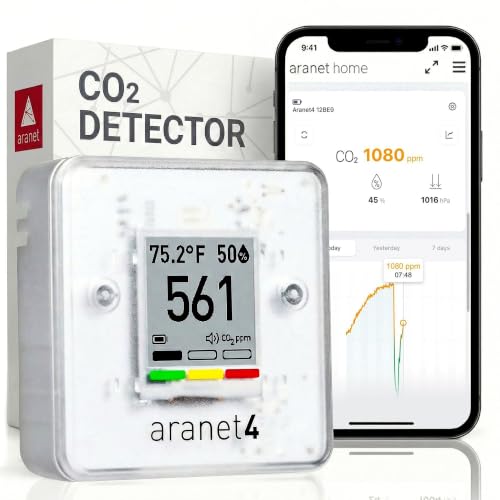
For most people who want a history they can actually look back at, the SAF Aranet4 is the pick: it is the only product here that publishes a specific retention figure, 90 days of historical data in its free app, and it does so without requiring an account or an internet connection to keep logging. The Airthings 2960 View Plus is the pick if radon matters as much as CO2 and you accept that the monitor requires the app, an account and internet access to function. The Temtop M100 2nd Gen and P2 is the pick if you want to compare CO2 in more than one room at once, because it is the only system here that pairs a host unit with a sub-monitor and correlates the two. The Autopilot Desktop CO2 Monitor and Data is the outlier: it is a grow-room logger with an on-device memory chart and no app at all, so it belongs on this page only as the counter-example of what data access means. The IQAir AirVisual Pro is a broad indoor air quality monitor whose history is reported as part of a wider AQI record, not as CO2-specific logging.
Retention is the number to check first, and only one listing here publishes it
Every product on this page can show you a CO2 reading. The question that separates them is how far back the record goes. That figure is called retention, and it is the single most useful specification in this category because it decides what questions you can answer later.
The SAF Aranet4 is the only listing in this batch that publishes a retention figure: the app supports viewing and analysing up to 90 days of historical data. That is a concrete, checkable claim. The Airthings 2960 View Plus states that data is saved securely in the cloud for seamless tracking and analysis, but does not publish a retention period. The Autopilot Desktop CO2 Monitor and Data publishes an on-device memory window of an adjustable 24-hour or 7-day period, which is a device figure rather than an app figure, and it is the shortest window here. The IQAir AirVisual Pro reports historical indoor AQI, temperature and humidity without stating how far back. The Temtop M100 2nd Gen and P2 promises live data, trends and alerts from both units in the app, without a retention figure.
Retention matters because CO2 problems are usually slow and repetitive. A single spike above 1,500 ppm after a party is interesting but not actionable. The same spike every weekday between 9am and 11am tells you the meeting room has no effective ventilation. You cannot see that pattern from a live screen, and you cannot see it from a chart that only holds a week.
What the listings publish, side by side
The table below uses only figures and statements that appear in the supplied product data. Where a listing is silent, the cell says so rather than guessing.
| Product | Measured parameters | App or data access | Published retention | Account or internet required |
|---|---|---|---|---|
| SAF Aranet4 | CO2, temperature, relative humidity, atmospheric pressure | Free smartphone app with graphs | Up to 90 days | Not stated in the listing bullets |
| Airthings 2960 View Plus | Radon, PM2.5, CO2, VOCs, humidity, temperature, pressure | Airthings app, WiFi, cloud storage | Not stated in the listing bullets | App and account required; internet required |
| Autopilot APCEM2 | CO2, relative humidity, temperature | On-device LED screen and memory chart | Adjustable 24-hour or 7-day period | Not applicable, no app |
| IQAir AirVisual Pro | PM2.5, CO2, smoke, dust, temperature, humidity, AQI | IQAir app on phone, tablet or desktop, Wi-Fi | Not stated in the listing bullets | Not stated in the listing bullets |
| Temtop M100 and the Airthings 2960 View Plus set | CO2, PM2.5, PM10, TVOC, temperature, humidity | Companion app over WiFi and Bluetooth, plus 7-inch touchscreen | Not stated in the listing bullets | Not stated in the listing bullets |
Two things stand out. First, the SAF Aranet4 is the only row with a retention figure, which is why it takes the overall pick despite measuring fewer parameters than the Airthings 2960 View Plus, the IQAir AirVisual Pro or the Temtop M100 2nd Gen and P2. Second, the Airthings 2960 View Plus is the only row where the listing is explicit that the device will not work without the app, the account and an internet connection. That is not a fault, but it is a commitment you should make knowingly.
The five monitors, and what each one does with your history
SAF Aranet4
The only product in this batch that publishes a retention figure for its app history, and the only one whose listing does not make an account a condition of use.
Airthings 2960 View Plus
A radon and multi-parameter monitor where the app is not optional: the listing states the monitor requires the Airthings app to function and that data is saved in the cloud.
Autopilot Desktop CO2 Monitor and Data Logger
A grow-room logger with an adjustable 24-hour or 7-day memory chart on the device itself. No app, no cloud, no phone. Included as the counter-example.
IQAir AirVisual Pro
A multi-parameter indoor monitor whose listing reports historical indoor AQI, temperature and humidity, with Wi-Fi and a rechargeable battery.
Temtop M100 2nd Gen and Set
The only multi-room system here: a master unit with a portable sub-monitor, correlating CO2 and pollutants across rooms through a WiFi and Bluetooth app.
The account question, and why it decides more than convenience
An account is not just a login. It determines where your data lives, who can see it, and what happens to the record if the manufacturer changes terms or the service is discontinued.
The Airthings 2960 View Plus is the clearest case. The listing states the monitor requires the Airthings app to function, that an account is required, that providing your email and name is enough, and that both the monitor and the app require internet access with data saved securely in the cloud. Read that as a chain: no internet, no monitoring. For a home that is usually fine. For a workshop, a greenhouse or a rental property with unreliable broadband, it is a real constraint.
The SAF Aranet4’s listing describes a free and interactive app for viewing and analysing up to 90 days of history, and it does not state an account requirement. The device itself has an e-ink display and a colour-coded CO2 number, so the live reading is available without the phone. That combination, a self-contained display plus an optional app, is the most forgiving arrangement on this page.
The IQAir AirVisual Pro and the Temtop M100 2nd Gen and P2 both use apps but their listings do not state whether an account is needed. Do not assume either way. If account-free operation matters to you, the SAF Aranet4 and the Autopilot Desktop CO2 Monitor and Data are the only two products here whose listings do not put an app in the critical path. The Autopilot Desktop CO2 Monitor and Data has no app at all.
Multi-room mapping, cloud logging and the grow room: three different jobs
The Temtop M100 2nd Gen and P2 is the only product here that addresses a genuinely different problem. It pairs an M100 master unit with a portable the Airthings 2960 View Plus sub-monitor and, according to the listing, monitors CO2 across multiple rooms simultaneously, correlating data from both units to advise when to open a window or run a purifier. If your question is whether the bedroom or the living room is the stuffy one, a single monitor cannot answer it without being carried from room to room, which breaks the continuity of the record. Two units logging at once can. The listing does not publish a retention period or an account requirement, so treat the app history as present but unspecified.
The IQAir AirVisual Pro takes the opposite approach: one unit, many parameters. Its listing covers PM2.5, CO2, smoke, dust, temperature, humidity and AQI, with professional-grade laser particle sensing, customisable alerts and historical indoor AQI. The history it reports is framed around AQI rather than CO2 alone, which is useful if you are tracking a broader air quality picture and less useful if CO2 is your only concern. It is rechargeable by outlet or USB, which helps with placement.
The Autopilot Desktop CO2 Monitor and Data is the grow-room instrument. Its listing specifies a 2-channel low-drift NDIR gas sensor, an audible alarm for low or high CO2, an operating range of 32 to 122 degrees F, and 0 to 95 percent noncondensing relative humidity. The memory chart holds an adjustable 24-hour or 7-day window. If you are managing CO2 enrichment in a greenhouse, that alarm and the trend chart are the point; a phone app would add nothing. For general indoor air quality, the short retention and the absence of an app make it the weaker choice. Readers tracking plant environments should look at CO2 monitors for greenhouses.
Where a history-capable CO2 monitor stops being the right instrument
A CO2 monitor with app history is a diagnostic and record-keeping tool. It is not a safety device, and none of the five listings here should be read as one.
None of these products detects carbon monoxide. None of them is a combustible gas detector. None of them is certified for confined space entry. The Airthings 2960 View Plus measures radon, which is a genuine health hazard, but the listing describes it as a continuous monitor, not as a replacement for a certified radon test conducted to a regulatory protocol. If your actual need is a legal radon measurement for a property transaction, a consumer monitor is the wrong instrument, however good its app is.
There is also a point at which logging becomes a burden rather than a benefit. If all you want is to know whether to crack a window, a live display with a colour code is enough, and the SAF Aranet4’s e-ink screen does that without any app at all. The app history only earns its place when you need to compare one period against another: before and after a ventilation change, term time against holidays, or one room against another. If you cannot name the comparison you intend to make, buy on the display and the sensor, not on the app.
For readers whose priority is the export rather than the graph, the distinction between viewing a chart and extracting a file matters; see monitors with exportable CO2 data and how to export and read CO2 monitor data. None of the five listings on this page states an export format, so if a CSV file is a requirement, that is the page to read before buying here.
Recommended Tools


Products shown because their documented specifications fit this guide. Price and availability are on Amazon and can change.
Frequently Asked Questions
Which of these actually stores data I can look at later?
All five store something, but only the SAF Aranet4 publishes how much: up to 90 days of historical data in its app. The Autopilot Desktop CO2 Monitor and Data stores an adjustable 24-hour or 7-day window on the device itself. The Airthings 2960 View Plus states that data is saved securely in the cloud but does not publish a retention period. The IQAir AirVisual Pro and the Temtop M100 2nd Gen and P2 describe historical data and trends without stating a retention figure. If retention length is your deciding factor, the SAF Aranet4 is the only listing that lets you check it before buying.
Do I need an account and an internet connection?
the Airthings 2960 View Plus is explicit: the monitor requires the Airthings app to function, an account is required, and both the monitor and the app require internet access. The SAF Aranet4's listing describes a free app but does not state an account requirement, and the device has its own e-ink display, so live readings work without a phone. The Autopilot Desktop CO2 Monitor and Data has no app and needs nothing. The IQAir AirVisual Pro and the Temtop M100 2nd Gen and P2 do not state whether an account is required, so do not assume either way.
Can I use one of these to compare CO2 in two rooms at once?
Only the Temtop M100 2nd Gen and P2 is designed for that. Its listing describes an M100 host unit plus a portable the Airthings 2960 View Plus sub-monitor, monitoring CO2 across multiple rooms simultaneously and correlating data from both units. Any of the others can be carried between rooms, but you lose the continuous record for the room you left, and you cannot align the two timelines.
Is a CO2 monitor with an app a safety device?
No. None of the five products here detects carbon monoxide, combustible gas or smoke as a safety function, and none is described as suitable for confined space entry. The Airthings 2960 View Plus measures radon, but its listing presents it as a continuous monitor, not a certified regulatory test. Treat all of these as diagnostic instruments that inform ventilation decisions, not as alarms that protect life.
Does the CO2 sensor type matter for the history?
It matters for the data quality, not the storage. The Autopilot Desktop CO2 Monitor and Data's listing names a 2-channel low-drift NDIR gas sensor, which is the standard technology for CO2 measurement and the reason its readings stay stable over long logging periods. The other four listings do not name a CO2 sensor technology. NDIR is what you want in any CO2 instrument; where a listing does not say, you cannot verify it from the page.
What if I need to export the data as a file rather than view a graph?
None of the five listings on this page states an export format, a sampling interval or a file type. The SAF Aranet4 publishes 90 days of in-app history, the Autopilot Desktop CO2 Monitor and Data publishes an on-device chart, and the rest describe trends and cloud storage without formats. If a CSV or similar file is a hard requirement, check that separately before buying here; the listings as supplied do not answer it.
Affiliate disclosure: Akermin earns a commission from qualifying Amazon purchases made through links on this page. Our editorial picks are based on documented specifications and owner feedback, not commissions.