Best Digital Hygrometers: 12 Smart Picks for Precise Humidity Tracking
A hygrometer is the cheapest instrument that will change how you run a house, a greenhouse or a guitar case, which is exactly why the market is full of them and why the specifications are so thin. This hub sorts twelve current models by how they connect, what accuracy they state and how many sensors you get, and links down to the humidity guides on this site.
Independent Research
Verified Specifications
Honest Recommendations
One Room One Sensor
Check With Salt
Watch the Trend
As an Amazon Associate, Akermin earns from qualifying purchases. Product links on this page are affiliate links.
Our Top Picks
Each hygrometer was compared on what its own listing states: how it connects, whether an accuracy figure is published, what it reports besides temperature and humidity, how many sensors are in the box and whether readings are stored. We did not run laboratory tests and publish no humidity measurements of our own.
Best Overall
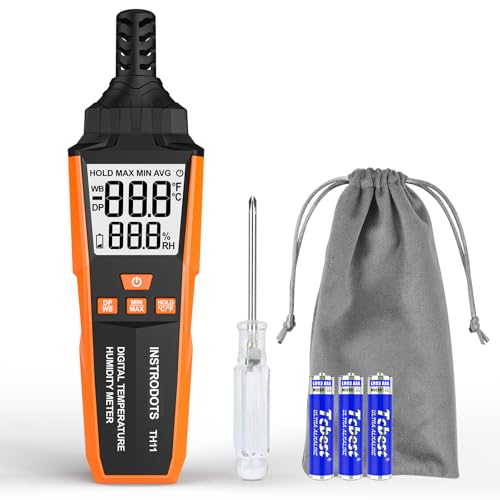
INSTRODOTS High Precision Digital Hygrometer with Dew Point
A named Swiss semiconductor sensor and a dew point readout, not just a room number.
Manufacturer states a high-precision semiconductor sensor from Switzerland
Reports ambient temperature and dew point as well as humidity
Values are taken from each manufacturer own listing. Only the TempPro TempAir IPX5 listing publishes a numeric accuracy figure, which is why the accuracy column is almost entirely Not stated. A missing figure is a gap in the published specification, not a measurement we made.
How to Choose a Digital Hygrometer
Four practical questions:
One Room or Several
Humidity problems are comparative. A three or six pack placed permanently tells you more than one good meter carried from room to room, because the weather changes between readings.
Does It Need to Warn You
A screen reports after the fact. If a cellar, greenhouse, humidor or holiday home has a threshold that matters, buy a connected sensor that sends an alert.
Stated Accuracy
Almost nothing in this category publishes a number. Where one is given, such as plus or minus 2 percent RH, it is worth paying attention to, because it is a commitment the others avoid making.
Where It Will Sit
Away from radiators, windows, doorways, vents and outside walls, at roughly the height that matters. A sensor in a bad spot is accurate about the wrong air.
The standard field method is a saturated salt test. Table salt mixed with a little water in a sealed container holds the air above it at about 75 percent relative humidity at room temperature, so a hygrometer sealed in with it for several hours should read close to that. Our hygrometer calibration guide gives the full procedure, including how long to leave it and what tolerance to accept.
Why do my three hygrometers show different numbers in the same room?
Partly because inexpensive relative humidity sensors carry several percentage points of error and drift with age, and partly because a room is not uniform. A sensor near a window, above a radiator or against an outside wall genuinely sits in different air. Group them together for an hour before deciding whether they disagree, and expect a few points of spread even then.
What does resolution mean on a hygrometer display?
Resolution is the smallest step the display can show, such as 0.1 percent. Accuracy is how close the reading is to reality. A display showing 0.1 percent steps on a sensor accurate to plus or minus 3 percent looks precise and is not. Our guide on resolution in digital meters covers the distinction, which applies equally to multimeters and thermometers.
Where should a hygrometer be placed in a room?
Away from heat sources, direct sunlight, doorways, extract fans and outside walls, roughly at the height that matters for the question. For comfort, that is seated or standing height. For a condensation investigation, take a reading near the cold surface as well as in the room centre, because the air right against a cold wall is not the same air as the middle of the room.
Is a Wi-Fi hygrometer worth it over a plain one?
Only if you need history or alerts. A plain sensor answers what the humidity is when you look at it. A connected one answers what it did overnight, what it did while you were away, and warns you when it crosses a line. For a spare room that is a luxury; for a cellar, a greenhouse or a stored instrument it is the whole point.
Reviews
INSTRODOTS High Precision Digital Hygrometer with Dew Point Best Overall
Nearly every hygrometer on the market says high precision. This is one of the few whose listing says where the sensor comes from, and naming a Swiss semiconductor sensing element is a meaningful signal in a category where the sensor is usually anonymous. Sensor quality is the entire instrument here: the case, the screen and the stand cost almost nothing, and the difference between a hygrometer worth trusting and one that is decorative sits in a component the size of a grain of rice.
The dew point readout is the second reason it leads. Most consumer hygrometers show relative humidity and temperature and stop, which leaves the user comparing two rooms at different temperatures and drawing the wrong conclusion. Dew point does not move with temperature, so it is the number that lets you say honestly that one room genuinely holds more moisture than another.
INSTRODOTS publishes no numeric accuracy figure on this listing, so the table records Not stated there, and there is no logging or app connection. This is a device to put in one important place and read carefully, not a sensor network. If you need history or remote access, one of the connected units below suits better.
Govee WiFi Thermometer Hygrometer H5179 Best Connected
The value of a connected hygrometer is not convenience, it is the alert. A cellar that drifts above the mould threshold, a greenhouse that dries out on a hot afternoon, a holiday home that freezes, a guitar case that drops below the range the timber tolerates: all of these are problems that a screen on a shelf reports only after the damage is done. Govee states WiFi and Bluetooth connection through its Home app and notification alerts on threshold crossings, which is the mechanism that turns a reading into a warning.
The dual connection is worth noting. Bluetooth works when the sensor is near the phone and needs no network; WiFi works from anywhere but depends on the router staying up and on the manufacturer cloud service continuing to exist. A device with both degrades gracefully: lose the network and you can still read it locally.
Govee does not publish an accuracy figure on this listing, and the usual reservations about cloud-connected sensors apply, namely that the alerting depends on a service outside your control. For a room whose humidity matters enough to warn you about, it is still the most practical configuration here.
Strengths
WiFi and Bluetooth in the same unit
Threshold alerts rather than passive display
Readable remotely from the app
Falls back to local Bluetooth if the network drops
TempPro TP49 Digital Hygrometer Indoor Thermometer, 3 Pack Best Value
One hygrometer tells you about one room, and one room is rarely the problem. The reason a multi-pack is the value pick is that humidity complaints are comparative: the back bedroom against the landing, the cellar against the hallway, the north wall against the south. Three sensors placed at the same time let you see the shape of a house in an afternoon, which a single wandering meter cannot do because the weather changes between readings.
TempPro keeps the presentation deliberately simple, with face icons marking dry, comfortable and wet air alongside the numbers. That is aimed at the actual decision most owners face, which is whether to run the humidifier or the dehumidifier today, and it makes the sensors usable by people who will not read a chart.
No accuracy figure is stated, there is no logging and there is no app, so these are indicators rather than instruments. Their best use is exactly that: leave them in place permanently so the comparison between rooms is always available, and keep one accurate meter for the readings that have to be defended.
Short answer: the INSTRODOTS high precision hygrometer is the pick where one reading has to be right, because it names its Swiss sensing element and adds a dew point readout; the Govee H5179 is the connected choice, with WiFi, Bluetooth and threshold alerts; and the TempPro TP49 three pack is the value buy, because comparing rooms simultaneously teaches you more about a house than one better meter carried around it.
What separates a hygrometer from a decoration
Nearly every device in this category looks identical: a small case, a number for temperature, a number for humidity and a smiling or frowning face. The differences that matter are invisible from the photograph. First, the sensing element, which is where all the cost and all the accuracy live; the INSTRODOTS listing naming a Swiss semiconductor sensor and the U UNNI listing naming a Sensirion sensor are unusual in saying anything at all. Second, whether an accuracy figure is published; in this group of twelve, only the TempPro TempAir IPX5 commits to one, at plus or minus 1 degree Fahrenheit and plus or minus 2 percent relative humidity. Third, whether the reading ever leaves the screen. Everything else is packaging.
Why a multi-pack often beats a better single unit
Humidity questions are almost always comparisons. Is the back bedroom worse than the front. Is the cellar the source or the symptom. Does the north wall sit closer to its dew point than the south. A single meter carried from room to room cannot answer those cleanly, because the weather, the heating and the occupancy all change between readings. Three or six sensors left permanently in place make the comparison instantaneous and keep making it for years. That is the case for the TempPro three pack, the JEDEW two pack and the JJMTDS six pack, and it is why a modest sensor in the right place outperforms a good sensor in the wrong one. Keep one better instrument for readings that have to be defended, and let the cheap sensors do the surveying.
Connected sensors and what the connection is for
Four of the twelve connect: the Govee H5179 by WiFi and Bluetooth, the GoveeLife 2.0 through a gateway that pairs up to ten sensors, the TempPro TempAir over Bluetooth to a stated 260 feet, and the Freshliance BlueTag TH20 as a Bluetooth data logger. The reason to pay for any of them is not reading the number from the sofa. It is the alert and the history. A cellar that crosses a mould threshold at three in the morning, a greenhouse that dries out while you are at work, a stored instrument in a case that drops below the range the timber tolerates: these are problems you want to be told about, not problems you want to discover. Note the dependency, though. WiFi sensors normally route through a manufacturer cloud service, so the alerting works for as long as that service does. Bluetooth is local and durable but only reaches as far as the phone.
Loggers, gateways and the difference between them
A gateway sensor like the GoveeLife 2.0 keeps its history in an app and a cloud account, which is convenient and shared across devices. A dedicated logger like the Freshliance BlueTag TH20 keeps the record on the device and hands it over on demand, which is the right model where the record has to survive independently of an account, such as cold chain checks, stored goods or evidence for a landlord. For anything involving a documented record over weeks, look at the dedicated logging category rather than a consumer hygrometer, and see our data logger guide for the specification that matters, which is interval range, memory depth and export format.
Resolution, accuracy and the false confidence of a decimal point
A hygrometer that displays 47.3 percent looks more trustworthy than one displaying 47 percent, and often is not. Resolution is the smallest step the screen can show; accuracy is how far the reading can be from the truth. A display with 0.1 percent steps sitting on a sensor with several percentage points of real error is showing precision it does not possess. Since almost no listing in this category publishes an accuracy figure, the practical response is to distrust the decimal, compare sensors against each other rather than against an absolute standard, and check any unit that matters with a saturated salt test. Our explainer on resolution in a digital meter covers the same trap on multimeters and thermometers.
Placement, drift and keeping the readings honest
A perfect sensor in a bad location gives a wrong answer with complete confidence. Keep hygrometers away from radiators, direct sun, extract fans, doorways and outside walls, and off the floor unless floor level is the question. In a condensation investigation take a reading in the room centre and another close to the cold surface, because those are different air. Over time, expect drift: relative humidity sensors age, and a unit that has spent two years in a workshop or a greenhouse will not read as it did new. A salt test once a year on the units you rely on is cheap, and the calibration guide walks through it. Sensors that have clearly drifted are not worth adjusting at this price; replace them.
Hygrometers were compared on manufacturer listing text: connection method, stated accuracy, additional readings, pack size, logging and any named sensor component. Owner feedback was reviewed for recurring comments on unit-to-unit disagreement, battery life and app reliability. We did not run laboratory tests, did not place any unit in a reference humidity chamber and publish no measurements of our own. Amazon data supplies images, availability and links only.
Both cover 35 to 130 dB. The SL510 states Class 2 with 1 dB accuracy, fast and slow response and min and max. The 407732 is supplied as a kit with a calibrator.
The BT-100 states 0.67 to 67.1 mph at 2 percent of reading with eight vanes and a tripod thread. The TS-301 states six units, a 2.26 inch backlit screen and humidity as well as temperature.
The TP50 states 2 to 3 percent relative humidity and 1 F accuracy with a comfort icon and high and low records. The 605i is a Bluetooth probe with a bendable head and automatic dew point.