Skip to content
AkerminMeasure. Monitor. Improve. Compare Products

Best Wireless Hygrometers for Multiple Rooms: 6 Picks

Mapping humidity across a house means more than buying one gauge. You need enough sensors for the rooms that matter, a radio link that survives masonry, and a way to read the numbers without walking the hallway. The five systems here differ mainly in sensor count, transmission range and whether the data lands on a dedicated display or a phone app.

  • Independent Research
  • Verified Specifications
  • Honest Recommendations

Measure It
Compare It
Buy Once

As an Amazon Associate, Akermin earns from qualifying purchases. Product links on this page are affiliate links.

Our Top Picks

This comparison is based on the manufacturer listings supplied for each product, plus general knowledge of how 433 MHz and Bluetooth radios behave in buildings. Where a listing does not publish a figure, the table says Not stated rather than estimating.

Best overall
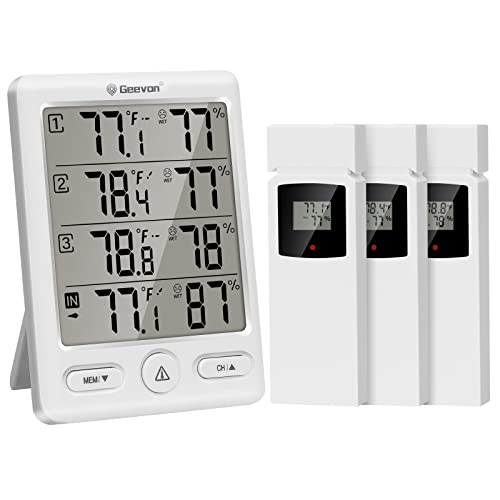
Geevon 3-Sensor Wireless Hygrometer

Geevon 3-Sensor Wireless Hygrometer

Three sensors plus a display, 200 ft stated range, 433 MHz.

  • Ships with 3 remote sensors; display supports 4 locations simultaneously
  • Stated transmission range 200 ft / 60 m on 433 MHz
  • Indoor temp range 50 to 140 F, outdoor -58 to 158 F, accuracy +/-1.8 F / 1 C
  • Humidity range 20 to 95 percent with +/-5 percent accuracy
View on Amazon Read Full Review→
Best display
Geevon 5-Inch Display Hygrometer

Geevon 5-Inch Display Hygrometer

Same three-sensor system with a larger 5-inch screen and 8-second backlight.

  • 5-inch LCD with 8-second backlight
  • Ships with 3 remote sensors; 4 locations on one display
  • Stated 200 ft / 60 m range on 433 MHz
  • Battery powered, tabletop or wall-mountable
View on Amazon Read Full Review→
Best for always-on backlight
Geevon USB-Powered Hygrometer

Geevon USB-Powered Hygrometer

5-inch display with USB power so the backlight stays on.

  • 5-inch large display with backlight
  • USB power feature keeps the backlight on continuously
  • Ships with 3 remote sensors; 4 locations on one display
  • Stated 200 ft / 60 m range on 433 MHz
View on Amazon Read Full Review→
Best for alerts
Geevon Hygrometer with Temp Alarm

Geevon Hygrometer with Temp Alarm

Three sensors, stated accuracy, comfort indicator and a temperature alarm.

  • Ships with 3 remote sensors; 4 locations on one display
  • Stated 200 ft / 60 m range on 433 MHz
  • Indoor temp 50 to 140 F, outdoor -58 to 158 F, accuracy +/-1.8 F / 1 C
  • Humidity 20 to 95 percent with +/-5 percent accuracy, temp alarm included
View on Amazon Read Full Review→
Best app-based
Govee H5075 3-Pack with Bluetooth App

Govee H5075 3-Pack with Bluetooth App

Three Bluetooth sensors, app logging, stated +/-3 percent RH accuracy.

  • 3-pack of sensors, each with a 3-inch LCD
  • Bluetooth range stated as 196 ft / 60 m
  • Temperature accuracy stated as +/-0.54 F, humidity +/-3 percent RH
  • 2-second refresh rate, app with max/min records and comfort indicators
View on Amazon Read Full Review→
Best if you want a weather station
Generic Wireless Weather Station

Generic Wireless Weather Station

Three sensors, atomic time, alerts and a dual-power display.

  • Three remote sensors, stated 200 ft / 60 m open-air range
  • 14 functions including atomic timekeeping, calendar and alerts
  • Dual power: DC adapter or batteries
  • Backlight stays on with four brightness levels when adapter powered
View on Amazon Read Full Review→

Comparison Table

View Full Comparison→
PickSensors includedStated rangeHumidity accuracyDisplay or app
3200 ft / 60 m, 433 MHz+/-5 percent RHDedicated displayView
3200 ft / 60 m, 433 MHzNot stated5-inch display, 8s backlightView
3200 ft / 60 m, 433 MHzNot stated5-inch display, USB backlightView
3200 ft / 60 m, 433 MHz+/-5 percent RHDisplay with temp alarmView
3196 ft / 60 m, Bluetooth+/-3 percent RHPhone app, per-sensor LCDView
3200 ft / 60 m open airNot statedWeather station displayView

Range figures are open-air claims from the listings. Masonry, foil-backed insulation and metal studwork will all reduce the practical distance, and no listing publishes a through-wall figure.

How to choose

Five decisions that matter more than the brand name on the box.

Count the rooms that matter

Three sensors plus the display's own sensor gives four locations. That is usually enough for a bedroom, a bathroom, a basement and the room you live in. If you need more, buy a system that states a higher sensor limit, not a second display.

Match the radio to the walls

433 MHz travels further through masonry than 2.4 GHz Bluetooth. If the sensor has to cross a brick or stone wall, favour the 433 MHz systems (P1, P6, P7, P8, P9) over Bluetooth (P10).

Decide whether you need history

A live number tells you the current state. A 24-hour min tells you what happened overnight. The Geevon displays show max/min on screen; the Govee app logs it. Pick based on whether you will act on the trend.

Read the accuracy figure, not the resolution

A display showing 47.3 percent RH is not accurate to 0.1 percent. The stated accuracies here are +/-3 to +/-5 percent RH. Anything finer is display resolution, not measurement accuracy.

Know what it will not do

These are monitors, not alarms in the safety sense. A humidity reading will not warn you about carbon monoxide or combustible gas. For those you need dedicated detectors, not a hygrometer.

Plan for power and placement

Sensors are battery powered and the listings do not state life. Put sensors where you can reach them without a ladder. If you want an always-on backlight, choose a USB-powered display (P7) near a socket.

Frequently Asked Questions

View All FAQs→
How many sensors do I need to map a house?

Four locations is a good starting point: the room you occupy most, a bedroom, a bathroom and a basement or garage. All the multi-sensor systems here ship with three remote sensors plus a sensor in the display, which gives four. If you have a larger house, look for a system that states a higher sensor limit; the listings here do not state one above four.

Will 433 MHz or Bluetooth get through a brick wall?

Both will, but 433 MHz generally travels further through masonry than 2.4 GHz Bluetooth because it is absorbed less by water and dense material. The listings state open-air ranges of 200 ft / 60 m for the 433 MHz units and 196 ft / 60 m for the Bluetooth unit. No listing publishes a through-wall figure, so treat the open-air number as an upper bound, not a promise.

Is +/-5 percent humidity accuracy good enough?

For spotting a room that is consistently wetter than the rest of the house, yes. For diagnosing a specific damp problem or checking a cigar humidor, no. If you need finer, the Govee H5075 states +/-3 percent RH. For serious building diagnostics you want a calibrated data logger, not a consumer hygrometer.

Do I need an app or is a display enough?

A display is enough if you want to glance and act. An app is worth it if you want history, alerts and the ability to check a room you are not in. The Geevon units give you a display and no app; the Govee H5075 gives you an app and no central display. Pick the one that matches how you will actually use it.

Reviews

Geevon 3-Sensor Wireless Hygrometer

Geevon 3-Sensor Wireless Hygrometer Best overall

The Geevon P1 is the baseline multi-room setup: one display unit and three battery sensors that talk back on 433 MHz. The listing states a 200 ft / 60 m open-air range, which is the figure to treat with caution. At 433 MHz the signal penetrates plasterboard and timber stud walls well, but a double-skin brick or stone wall will cut that range substantially. In a typical two-storey house you will usually get one floor of separation plus a room or two; a sensor in a detached garage or a basement behind a concrete retaining wall may drop out. The listing does not state a wall-penetration figure, only the open-air number.

The display shows all four locations at once, with 24-hour max and min records and trend arrows. That matters more than it sounds: a single humidity reading tells you almost nothing, but a 24-hour min tells you whether a bedroom is spiking overnight when the windows are shut. The comfort indicator turns the number into a dry, comfort or wet cue, which is enough for most homeowners.

Accuracy is stated as +/-1.8 F and +/-5 percent RH. The humidity figure is the realistic one for this class of sensor. Do not expect laboratory-grade data; expect to spot a room that is consistently 15 percent wetter than the rest of the house, which is the actual job.

Strengths

  • Three sensors included, so four rooms covered out of the box
  • Dedicated display means no phone needed to read the house
  • 24-hour max/min records and trend arrows on the display
  • 433 MHz signal generally travels further through walls than 2.4 GHz

Limitations

  • 200 ft range is open-air only; masonry will reduce it
  • No app, no logging, no remote access
  • Humidity accuracy of +/-5 percent is coarse for diagnosing damp
  • Sensors are battery powered; the listing does not state battery life
View on Amazon
Geevon 5-Inch Display Hygrometer

Geevon 5-Inch Display Hygrometer Best display

P6 is functionally the same radio system as P1: three sensors, 433 MHz, 200 ft stated range, four locations on one screen. The difference is the display. The 5-inch LCD with an 8-second backlight is easier to read across a room, and the backlight is the part that matters at night or in a dim hallway. Eight seconds is short; you press the button, read, and it fades. That is normal for battery-powered units trying to preserve cell life.

The listing does not publish temperature or humidity accuracy figures for P6, so if that matters to you, P1 or P8 state them explicitly. What P6 does publish is the display size and the backlight duration, which are the two things you notice every day. If the unit will sit on a kitchen counter or a hallway shelf and be glanced at rather than studied, the larger screen is the practical upgrade.

Mounting is tabletop or wall, and it runs on batteries. The listing does not state how many cells or how long they last. For a multi-room map, the sensor placement matters more than the display: put one in the coldest room, one in the wettest room (bathroom or basement), and one in the room you actually occupy.

Strengths

  • 5-inch display is legible from across a room
  • 8-second backlight helps in low light
  • Three sensors included, same 433 MHz link as the rest of the range
  • Wall or tabletop mounting

Limitations

  • Accuracy figures not stated in the listing bullets
  • Backlight only stays on for 8 seconds
  • No app or logging
  • Battery type and life not stated
View on Amazon
Geevon USB-Powered Hygrometer

Geevon USB-Powered Hygrometer Best for always-on backlight

P7 is the version to pick if you want the display lit all the time. The listing states a USB power feature that keeps the backlight on, which removes the 8-second timeout problem of P6. That is a genuine difference in daily use: a permanently lit display on a desk or a hallway console reads like a clock, and you can see the whole house at a glance without pressing anything.

The trade-off is a cable. USB power means the display needs to sit near a socket or a powered hub, which limits where you put it. The sensors are still battery powered and still use the same 433 MHz link with a stated 200 ft / 60 m open-air range. The listing does not publish accuracy figures for P7, so treat it as a display and convenience pick rather than a metrology pick.

If you have a socket where you want the display, this is the most usable of the Geevon units. If not, P6 or P1 will do the same job on batteries with a shorter backlight.

Strengths

  • Backlight stays on when USB powered
  • 5-inch display, easy to read across a room
  • Three sensors included
  • Same 433 MHz link as the rest of the range

Limitations

  • Needs a USB socket for the always-on backlight
  • Accuracy figures not stated in the listing bullets
  • No app or logging
  • Sensors still battery powered
View on Amazon
Geevon Hygrometer with Temp Alarm

Geevon Hygrometer with Temp Alarm Best for alerts

P8 is the Geevon unit that publishes both its accuracy figures and an alarm. The temperature alarm is the feature that separates it from P1: you can set a threshold and be told when a room crosses it, rather than having to look. For a basement, a garage or a room with plants, that is the difference between noticing a problem and discovering it a week later.

The stated accuracy is the same as P1: +/-1.8 F and +/-5 percent RH, with a 20 to 95 percent humidity range. The comfort indicator and 24-hour max/min records are present as on the other Geevon units. The listing does not state whether the alarm is audible only or also visual, and it does not state battery life.

If you want one display that covers four rooms and will shout when something drifts, this is the pick. If you only want to read the numbers, P1 or P6 will do it for less complexity.

Strengths

  • Temperature alarm included, useful for basements and plant rooms
  • Accuracy figures stated in the listing
  • Three sensors included
  • Comfort indicator and 24-hour max/min records

Limitations

  • Humidity accuracy of +/-5 percent is coarse
  • Alarm type (audible or visual) not stated
  • No app or logging
  • Battery life not stated
View on Amazon
Govee H5075 3-Pack with Bluetooth App

Govee H5075 3-Pack with Bluetooth App Best app-based

The Govee H5075 is a different architecture from the Geevon units. There is no central display; each of the three sensors has its own 3-inch LCD and its own Bluetooth radio, and the Govee Home app collects them on your phone. That means you can put a sensor in three rooms and read all three from the app, but you cannot glance at one screen on the wall and see the whole house. If you want a wall display, this is not it.

What you get instead is better stated accuracy and logging. The listing states +/-0.54 F and +/-3 percent RH, which is finer than the +/-5 percent of the Geevon units, and a 2-second refresh rate. The Bluetooth range is stated as 196 ft / 60 m, but Bluetooth is 2.4 GHz and behaves differently from 433 MHz: it is more readily absorbed by water and by dense masonry, so expect the practical range through a brick wall to be shorter than the open-air figure. The listing does not state a wall-penetration figure.

The app is the reason to buy it. You get history, alerts and the ability to check a room you are not standing in, provided you are within Bluetooth range. There is no Wi-Fi bridge in the listing, so remote access from outside the house is not stated.

Strengths

  • Stated humidity accuracy of +/-3 percent RH, finer than the Geevon units
  • App logging and history, not just a live reading
  • Three sensors included, each with its own LCD
  • 2-second refresh rate

Limitations

  • No central display; you need the phone to see all rooms at once
  • Bluetooth only, no stated Wi-Fi or remote access
  • Bluetooth range through masonry will be shorter than the open-air figure
  • Each sensor needs its own battery; life not stated
View on Amazon
Generic Wireless Weather Station

Generic Wireless Weather Station Best if you want a weather station

P9 is a weather station rather than a pure hygrometer, and that changes what you are buying. It ships with three sensors and covers four locations, but it also adds atomic timekeeping, a calendar and customisable alerts. If you want a hallway console that tells you the time and the weather as well as the humidity, that is a reasonable bundle. If you only want humidity, you are paying for functions you will not use.

The listing is vague where it matters. It states a 200 ft / 60 m open-air range, which is the same class as the Geevon units, but it does not publish temperature or humidity accuracy figures at all. For a device whose main job is measurement, that is a gap. The dual power arrangement is a genuine plus: on the DC adapter the backlight stays on with four brightness levels, and on batteries it falls back to a press-to-light behaviour.

Treat this as a lifestyle console. If you need to know whether a room is at 55 percent or 65 percent RH, the missing accuracy figure makes it hard to recommend over P1 or P8.

Strengths

  • Three sensors and four locations covered
  • Atomic time, calendar and alerts included
  • Dual power with always-on backlight on adapter
  • Four brightness levels

Limitations

  • Temperature and humidity accuracy not stated in the listing
  • More functions than a pure hygrometer, more to configure
  • Batteries not included
  • Brand is listed as Generic, so support and spares are unclear
View on Amazon

Buying Guide

Short answer: For most houses, the Geevon systems (P1, P6, P7, P8) are the straightforward choice: each ships with three remote sensors and a dedicated display, so you get four rooms of temperature and humidity on one screen without a phone. If you want app logging and a smaller sensor footprint, the Govee H5075 3-pack (P10) is the pick, though it is Bluetooth only and each sensor reports to your phone rather than to a central display. The U UNNI units (P2, P3, P4) are the same product listed three times, so choose on availability. The AyayaBoss 3-pack (P11, P12) is a set of standalone mini gauges with no wireless link at all, useful only as a supplement. The Generic weather station (P9) adds atomic time and alerts but its listing is vague on sensor accuracy.

What the range figure actually means

Every listing on this page quotes a range in feet or metres, and every one of those figures is an open-air number. The Geevon units state 200 ft / 60 m on 433 MHz. The Govee states 196 ft / 60 m on Bluetooth. Neither figure tells you what will happen in your house, because radio range is not a property of the radio alone. It is a property of the radio, the frequency, the wall and the amount of water in the wall.

433 MHz sits in a band that penetrates plasterboard, timber and brick reasonably well. It is absorbed by water and by metal, so a foil-backed plasterboard wall, a metal stud partition or a wall with a foil vapour barrier will cut the signal sharply. Bluetooth at 2.4 GHz is absorbed more readily by water and by dense masonry, which is why a Bluetooth sensor in a basement often drops out when a 433 MHz sensor in the same spot survives. If your sensors have to cross a stone or double-brick wall, favour the 433 MHz systems. If they are all on the same floor with timber partitions, either will work.

The practical test is simple: put a sensor where you want it, walk to the display, and see whether it holds. If it drops, move the sensor a metre or two, or move the display. Radio is not line-of-sight, and small repositioning often fixes a dropout that looks like a hardware fault.

Sensor count and what four locations really covers

All the multi-sensor systems here ship with three remote sensors, and each display has its own internal sensor, so you get four locations. That is enough for a small house if you choose the rooms carefully. The mistake is to put a sensor in every bedroom and none in the rooms where humidity actually varies. Humidity varies most where water is produced or where the building is cold: bathrooms, kitchens, basements, garages, and any room with a cold external wall.

A better allocation is one sensor in the wettest room, one in the coldest room, one in the room you occupy most, and the display itself in a central hallway. That gives you a wet reading, a cold reading, a comfort reading and a reference. If you want to cover more rooms, look for a system that states a higher sensor limit; none of the listings here state one above four.

If you need to monitor a specific environment rather than a whole house, a dedicated approach is better. A hygrometer for indoor plants is chosen for the range and placement a plant needs, and a basement air quality monitor will tell you more about a damp basement than a general-purpose hygrometer can.

Display or app: the decision that shapes daily use

The Geevon and Generic units put everything on one screen. You walk past, you read four rooms, you move on. The Govee H5075 puts each sensor on its own small LCD and collects them in a phone app. You have to open the app to see the house. Neither is better in the abstract; they suit different habits.

A display is better when the reading is a background cue. You are not going to open an app every time you walk down the hall, but you will glance at a screen. An app is better when you want history, alerts or a record. The Govee app logs readings and can notify you; the Geevon displays show 24-hour max and min on screen but do not store a longer history. If you are trying to prove a pattern, for example that a bedroom spikes every night, the app is the more useful tool. If you are trying to notice a problem as it happens, the display wins.

One more consideration: the Geevon units are 433 MHz and the Govee is Bluetooth. If you want to check the house from outside, neither does it without a bridge, and no listing here states one. For remote access you need a different class of device, such as an environmental data logger for building monitoring.

Accuracy, resolution and the number on the screen

A display that shows 47.3 percent RH looks precise. It is not accurate to 0.1 percent. The stated accuracies here are +/-3 percent RH for the Govee and +/-5 percent RH for the Geevon units. That means a reading of 50 percent could be anywhere from 45 to 55 percent on the Geevon, and 47 to 53 percent on the Govee. The decimal place is resolution, not accuracy, and confusing the two is the most common mistake buyers make.

For mapping a house, +/-5 percent is fine. You are looking for a room that is 15 or 20 percent out of line with the others, and a 5 percent error will not hide that. For diagnosing a specific damp problem, checking a humidor or monitoring a museum store, you need a calibrated instrument and a stated accuracy you can trust. If that is your job, a humidity data logger is the right category, not a consumer hygrometer.

Temperature accuracy is stated as +/-1.8 F / 1 C on the Geevon units and +/-0.54 F on the Govee. Again, that is the measurement figure, not the display resolution. For comfort monitoring, both are more than adequate.

Where a hygrometer stops being the right answer

A hygrometer tells you about water vapour in the air. It does not tell you about water in the wall, carbon monoxide in the air, or whether the ventilation is actually working. If you have a damp patch, a musty smell or a cold room that never dries out, a humidity reading is a clue, not a diagnosis. You need a moisture meter for the fabric of the building and, often, a look at the ventilation.

If the concern is air quality rather than humidity, a hygrometer is the wrong instrument. A general air quality monitor will cover particulates and volatile organic compounds, which a hygrometer cannot see. If the concern is combustion, you need a dedicated gas detector, not a hygrometer; a hygrometer will not warn you about carbon monoxide and should never be relied on to.

Finally, a hygrometer is not an alarm. Some units here have a temperature alarm, which is useful, but none is a safety device. Treat the readings as information for comfort, plant care and building maintenance, and buy separate, certified instruments for anything that could harm you.
How We Research

This comparison is based on the manufacturer listings supplied for each product, plus general knowledge of how 433 MHz and Bluetooth radios behave in buildings. Where a listing does not publish a figure, the table says Not stated rather than estimating. Several products in the source data were excluded because they do not belong to this topic: the U UNNI units (P2, P3, P4) are the same product listed three times, and the AyayaBoss 3-pack (P11, P12) is a set of standalone mini gauges with no wireless link, so neither is a wireless multi-room system in the sense this page covers. The U UNNI listing is otherwise relevant and would be a reasonable alternative if availability favours it. No laboratory testing was performed and no measurements of our own are published.

Read our full review methodology→