As an Amazon Associate, Akermin earns from qualifying purchases. Product links on this page are affiliate links.
Verdict
The Touch is PurpleAir’s indoor sensor. It measures particles with the same laser counter technology as the outdoor models, adds temperature, humidity and pressure, runs from USB-C, and reports over 2.4 GHz Wi-Fi to the PurpleAir app and map. Instead of a screen it has a colour light that you tap to check or dim. It is designed to sit next to an outdoor PurpleAir sensor in the same account, so the app shows inside and outside on the same scale. It is not listed on Amazon US. For a household already on the PurpleAir map, it is the natural indoor addition. For a first indoor monitor, most buyers will prefer one of the listed devices with a display and a CO₂ sensor, such as the Qingping Air Monitor 2 or the IQAir AirVisual Pro.
Who It Is For
- Owners of a PurpleAir outdoor sensor who want the indoor comparison in the same app.
- Bedrooms and living rooms where a glanceable light is preferred to a screen.
- Anyone who wants to check whether an air purifier is keeping up during smoke events.
Our article on using an air quality monitor with an air purifier describes that last use in detail.
Documented Specifications
| Item | Documentation |
|---|---|
| Particle sensing | Laser particle counter |
| Reported values | PM1, PM2.5, PM10 estimates and particle counts by size |
| Environment | Temperature, relative humidity, atmospheric pressure |
| Indicator | Touch-controlled colour light |
| Connectivity | 2.4 GHz Wi-Fi to the PurpleAir map and app |
| Power | USB-C |
| Not measured | CO₂, VOCs, formaldehyde, radon |
| Availability | Direct from PurpleAir; not listed on Amazon US |
What an Indoor Particle Sensor Tells You
Indoors, PM2.5 comes from cooking, candles, fireplaces, smoking, vacuuming and outdoor air leaking in. A sensor in the living room shows each of these as a spike and shows how long the room takes to clear. During wildfire smoke it answers the question that matters most: is the indoor level lower than outdoors, and is the purifier bringing it down. Optical counters estimate mass from light scattering, so treat the absolute number as approximate and the trend as reliable. See choosing a PM2.5 monitor.
The Light and the App
The colour light follows the air quality bands used on the map. A tap wakes it; another dims it, which suits a bedroom. Without a numeric display, the app is where you read values and history. Real-time data is free; historical downloads run on PurpleAir’s points-based system, which matters little for a household but is worth knowing. If you also own an outdoor PurpleAir sensor, both appear in the app and the comparison is direct because they use the same counters and the same correction options.
Placement
Put the Touch where people spend time and where the air is representative: a living room shelf at head height rather than a kitchen counter, unless cooking is the thing you want to watch. Keep it away from humidifiers, which optical sensors read as particles, and out of direct sun, which warms the housing and skews the temperature reading. Because it is USB-C powered, the practical constraint is cable reach. One unit per floor is usually enough to see whether outdoor smoke is getting in; a second unit in a bedroom is the common next step. The wider question of how many sensors a home needs is covered in building a whole-home air quality monitoring setup.
Strengths
- Same sensor family as the outdoor PurpleAir models, so indoor and outdoor readings compare cleanly.
- Glanceable light that can be dimmed for sleep.
- USB-C power and simple setup.
Limitations
- Not listed on Amazon US.
- No CO₂, VOC or other gas sensing, so it cannot judge ventilation.
- No numeric display on the device.
How It Compares
The PurpleAir Zen adds a second counter and outdoor capability. The PurpleAir PIXEL is the smaller, simpler indoor unit. Among listed monitors, the Qingping Air Monitor 2 adds CO₂, eTVOC, noise and a touchscreen, and the Temtop S1 is a battery particle monitor with a display.
How We Research
This review is based on PurpleAir’s published product documentation and app help pages, third-party evaluations of PurpleAir sensors, and owner reports. The Touch is not listed on Amazon US. We did not run laboratory tests.
Recommended Tools

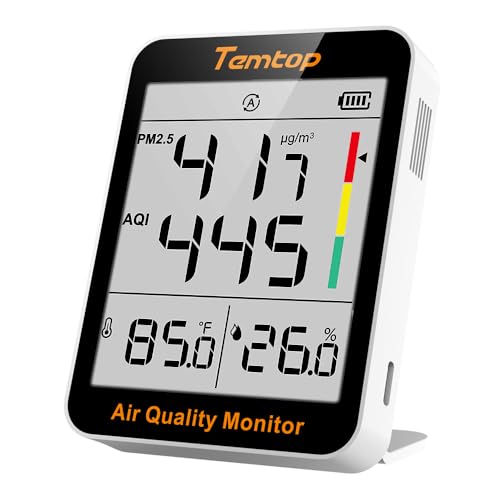

Products shown because their documented specifications fit this guide. Price and availability are on Amazon and can change.
Frequently Asked Questions
What does the touch control do?
Tapping the unit wakes or dims the colour light that shows the current air quality band, so it can be checked at night without a phone and kept dark otherwise.
Does it have a numeric display?
No. The light shows a colour band; the numbers are in the PurpleAir app and on the map.
Does the Touch measure CO₂?
No. PurpleAir sensors measure particles plus temperature, humidity and pressure. For CO₂ with particles, look at the Qingping Air Monitor 2 or IQAir AirVisual Pro.
Is it on Amazon US?
Not at the time of writing. PurpleAir sells it directly.
Affiliate disclosure: Akermin earns a commission from qualifying Amazon purchases made through links on this page. Our editorial picks are based on documented specifications and owner feedback, not commissions.