Best Thermal Cameras for Solar Panel Inspections: High-Sensitivity Picks for Hot Cells
A hot cell, a failed bypass diode or a loose connector shows up on a producing array as a patch a few degrees warmer than the cells around it. Finding it means scanning a lot of glass in sunlight, so sensitivity, refresh rate and handling on a roof decide the camera. These picks were sorted on those figures from manufacturer listings.
Independent Research
Verified Specifications
Honest Recommendations
Sun on the Array
Angle Off the Sky
Walk the Strings
As an Amazon Associate, Akermin earns from qualifying purchases. Product links on this page are affiliate links.
Our Top Picks
Cameras were compared for PV array scanning on stated NETD, native resolution, refresh rate, field of view, power source for a long roof session and documentation, all from manufacturer listings. We did not run laboratory tests or scan arrays ourselves; where a listing gives no figure the table says Not stated.
Best Overall
FLIR E8 Pro Thermal Imaging Camera
Native 320x240 with MSX and cloud records for commissioning reports.
320 x 240 native detector, 76,800 pixels
-20 to 550 C range covers cells, diodes, connectors and combiner boxes
MSX embosses panel edges and frames so a hot cell can be located on the array
Wi-Fi to FLIR Ignite cloud; 2-year camera, 10-year detector warranty
All values are the manufacturers' listing figures at the time of research. Upscaled resolutions appear in brackets and should not be compared with native counts. Not stated means the listing gives no figure; FLIR publishes NETD and refresh rate in its datasheets.
How to Choose a Thermal Camera for Solar Inspection
Four points decide it:
Sensitivity First
A mildly warm cell is a few degrees above its neighbors. A stated NETD under 40 mK makes it visible; only the P4, TR20 and Thor002 state a figure here.
Native Resolution
320 x 240 resolves individual cells from the row walkway. Upscaled 512 x 384 or 240 x 240 figures are software, not detector.
Refresh and Field of View
25 Hz keeps the image smooth while walking a string; a 50-degree lens takes in several modules per frame.
Power on the Roof
A phone-powered camera shares the phone battery; a standalone camera with a stated 10-hour runtime covers a full site.
What conditions do I need to thermally inspect a solar array?
Clear sun and a producing array. Short-circuit current scales with irradiance, so the modules need real light on them to generate the current that makes a faulty cell or diode heat up. Overcast skies and early morning give weak, misleading images. Scan with the system connected and producing, not isolated.
What does a failed bypass diode look like on a thermal camera?
Typically a whole substring of the module, a third of the panel on a common three-diode design, running warmer than the rest of the module and than neighboring modules. A single hot cell shows as one bright square. Confirm with an electrical test before claiming a warranty; the camera shows the symptom, not the cause.
Why does the whole array look hot or patchy from the front?
Glass reflects the sky and the sun. Facing a module square-on you can image a reflection of the sky, a cloud or yourself instead of the cells. Move to an angle of roughly 30 to 60 degrees off the glass and keep the sun behind you, and the cell pattern appears. This is a reflection problem, not a module fault.
Can a thermal camera replace an I-V curve tracer or insulation test?
No. The camera finds where to look. IEC 62446-1 commissioning tests, Category 1 (continuity, polarity, open-circuit voltage, short-circuit current, insulation resistance) and Category 2 (I-V curve), are electrical measurements that quantify the loss and confirm the fault. Our solar PV tester and multimeter guides cover those tools.
Reviews
FLIR E8 Pro Thermal Imaging Camera Best Overall
The E8 Pro is the solar camera for an installer or O&M contractor who has to document the array: commissioning images for a client file, warranty claims on a module with a hot cell, or a before-and-after record of a repaired connector. FLIR states a native 320 x 240 detector, which resolves individual cells on a module from the walkway between rows, and MSX, which embosses the frame and cell-grid edges onto the thermal image so the hot cell can be counted to its position on the panel.
The measurement range of -20 to 550 C is far beyond anything a healthy module reaches, which leaves headroom for a badly failed diode or a connector arcing under load. Images go over Wi-Fi to Ignite for storage and sharing, and FLIR covers the detector for 10 years.
The listing does not state NETD, refresh rate, field of view or battery life. Sensitivity in particular is the figure that decides whether a mildly warm cell stands out, and on this list only the P4 and TR20 state it.
Strengths
Native 320 x 240 resolves cells at row distance
MSX places the hot cell on the module grid
Ignite cloud suits commissioning and warranty records
10-year detector warranty
Limitations
NETD not stated on the listing
Refresh rate not stated; scanning smoothness unknown from the listing
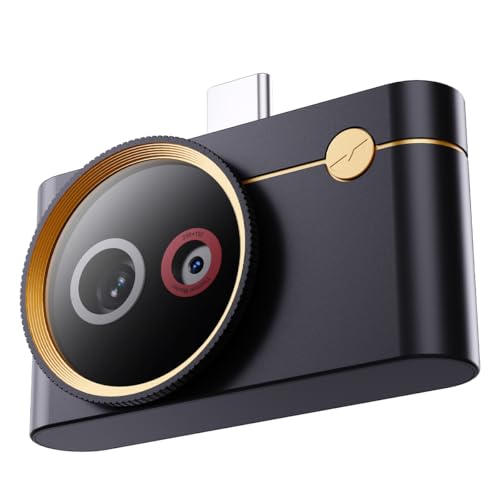
Thermal Master P4 Thermal Camera for Android Best Phone-Based
The P4 is the pick for sensitivity and for the roof: it states an NETD under 35 mK, the lowest figure on this list, and it hangs off an Android phone rather than adding a second device to carry up a ladder. Thermal Master lists a 256 x 192 native detector upscaled to 512 x 384, thermal-visible fusion from a dual lens, 15x digital zoom for pulling a single cell out of a module and hotspot tracking that marks the hottest point in a wide 56.0 by 42.2 degree field of view. Refresh is 25 Hz, so the image keeps up while walking a row.
The manufacturer states a range of -4 to 1112 F and an accuracy of plus or minus 3.6 F, with up to 5 hours of use on phone power and no separate battery to charge.
The trade-offs are the native resolution, which is below the 320 x 240 cameras, the dependence on a compatible Android or Windows device, and the absence of a standalone screen. The listing itself notes that the camera sees surfaces only; glass reflects, so angle matters.
The TR20 combines the two figures that matter most for scanning an array, a native 320 x 240 detector and a stated NETD under 40 mK, at a lower tier than the FLIR cameras, and adds 25 Hz refresh so the image does not smear while you pan along a string. The 50-degree wide-angle lens is a good match for a ground-mount row or a residential roof viewed from a ladder, taking in several modules per frame so a hot cell stands out against its neighbors.
MiLESEEY states automatic hot and cold spot tracking, a customizable alarm temperature and width, a 2.8-inch 480 x 640 display, video recording and PC analyzer software, which lets a technician record a walk along the rows and review it afterwards. The range of -4 to 1022 F and stated accuracy of plus or minus 2% are ample.
It lacks a visible-light overlay, so locating a hot cell on a specific module needs a note or a photo, and there is no cloud workflow. Owners generally describe the value as strong; the missing overlay is the main gap.
Strengths
Native 320 x 240 and stated NETD under 40 mK
25 Hz refresh for walking strings
Video recording and PC software for reviewing a scan
Wide 50-degree lens
Limitations
No visible-light overlay to locate a cell on the module
Short answer: the FLIR E8 Pro is the solar inspection camera for commissioning and warranty records, with a native 320 x 240 detector and MSX that places a hot cell on the module grid; the Thermal Master P4 is the phone-based pick with the lowest stated sensitivity on the list, NETD under 35 mK, plus dual-lens fusion and 25 Hz for walking rows; and the MiLESEEY TR20 is the value camera that pairs a 320 x 240 detector with a stated NETD under 40 mK, 25 Hz and a 50-degree lens for scanning a whole string at a time.
What solar faults look like thermally
A photovoltaic module that is working properly runs at a fairly even temperature across its face, a little above ambient in full sun. Faults break that evenness. A cracked or shaded cell that has become a load instead of a source shows as a single hot square. A failed bypass diode shows as a warm band, typically one substring of the module. A loose or corroded MC4 connector shows as a warm spot on the cable behind the module or at the end of a string. A whole module warmer than its neighbors can point at an open string or a module that has stopped producing. Each is a difference of a few degrees against a sunlit array, which is why thermal sensitivity is the first specification on this page rather than temperature range.
Conditions: the array has to be producing
Short-circuit current scales with irradiance, so the current that makes a faulty cell heat up only exists when real sunlight is on the modules. Scan on a clear day with the system connected and generating; an isolated array or a cloudy sky produces flat, uninformative images. Open-circuit voltage rises in cold, which matters for the electrical follow-up but not for the thermal scan. The other condition is angle: module glass reflects the sky and the sun, and imaging a panel square-on can show a reflection of a cloud or of the technician instead of the cells. Stand at an oblique angle with the sun behind you and the reflection moves off the glass while the cell pattern stays. Every camera here measures emitted energy from the surface it faces, which the Thermal Master listing spells out, so the reflection rule applies to all of them.
Sensitivity and resolution: the two figures that matter
NETD is the smallest temperature difference the detector can distinguish, in millikelvin, and lower is better. On this list the Thermal Master P4 states under 35 mK, the MiLESEEY TR20 under 40 mK and the Thermal Master Thor002 40 mK; the FLIR listings state no figure and the buyer has to consult the FLIR datasheet. Resolution decides whether a single cell can be picked out from the walkway between rows: a native 320 x 240 detector (76,800 pixels) on the E8 Pro, C8 and TR20 does that; the P4 and Thor002 are native 256 x 192 with software upscaling to 512 x 384, and the TOPDON TC004 Mini is 128 x 128 native. Upscaled figures add no measurements. How to compare thermal camera resolution and what NETD means cover both figures.
Refresh rate, field of view and the roof
Array inspection is a walking scan along rows, and at 9 Hz the image lags and smears while you move; the P4, TR20, Thor002 and TC004 Mini all state 25 Hz, and the FLIR listings state no rate. A wide field of view takes in several modules per frame so a hot cell is judged against its neighbors: the TR20 states 50 degrees, the P4 56 by 42 degrees, the C8 35 degrees horizontal and the TC004 Mini 40 by 30 degrees. Power matters on a large site. The P4 draws from the phone for up to 5 hours; the Thor002 states 10.5 hours from its own battery and the TC004 Mini 15 hours; the FLIR and MiLESEEY listings do not state runtime. On a rooftop, a phone-based camera is one less device to carry, but a phone screen in full sun is hard to read, and a standalone camera with a shaded screen is often easier.
Emissivity and what the reading means on glass
Emissivity has to be set for the surface for the temperature numbers to be accurate, and module glass is not the same as a painted enclosure; the aluminum frame and any bare metal on a rail or connector are shiny and read low. In practice the solar finding is comparative, a cell or module warmer than identical ones beside it, so an exact temperature matters less than a consistent setting across the scan. Record the emissivity used with the image, and treat any absolute value with caution until the electrical test confirms the fault. Our emissivity guide gives the method.
The electrical follow-up
A thermal image says where to look, not how much is being lost or why. Quantifying the fault is done with the IEC 62446-1 commissioning tests: Category 1 covers continuity, polarity, open-circuit voltage, short-circuit current and insulation resistance, and Category 2 adds the I-V curve. Voltages are real: residential strings are commonly under 600 V DC, commercial systems up to 1000 V and utility-scale up to 1500 V, and the meter used has to be rated for the string voltage and never used above its CAT or voltage rating. Insulation resistance on PV is measured on a de-energized string or with a method designed for live PV. The solar PV tester guide and how to measure open-circuit voltage cover the instruments and the procedure.
Related guides
The same cameras appear with different priorities in the electrical maintenance guide, where combiner boxes and inverter connections are scanned for hot lugs, and in the building envelope guide. For the electrical instruments that go with the camera, our basic solar testing toolkit guide lists a complete kit.
How We Research
Cameras were compared on manufacturer listing figures: stated NETD, native resolution, refresh rate, field of view, temperature range, power source and runtime, and documentation features. Owner feedback was reviewed for recurring comments on outdoor screen readability and image clarity. We did not run laboratory tests and did not scan arrays ourselves; we publish no measurements. Amazon data supplies images, availability and links only.
Yes, a pyrometer needs power, but the source depends on the type: batteries for handheld guns, mains or loop power for fixed sensors, and sometimes no local power for passive optical types.