As an Amazon Associate, Akermin earns from qualifying purchases. Product links on this page are affiliate links.
A classroom CO₂ monitor needs five things: a genuine NDIR sensor, a display large enough for the teacher to read from the front with a traffic-light color, battery power lasting years so there is no cable, a case that tolerates being handled, and thresholds set to school guidance (act above 1,000 ppm, ventilate urgently above 1,500). Wi-Fi logging is a bonus for the facilities team but is not what makes the monitor work in the room. Place it at 1.5 m on a side wall away from windows, doors and children.
Why classrooms are different
A classroom has the highest occupant density of almost any room: 30 people in 60 m² with the door shut. CO₂ climbs several hundred ppm every ten minutes and commonly exceeds 2,000 ppm before the bell. The monitor’s job is to prompt a simple action, opening windows or the door, in time. That makes visibility and simplicity the priorities. See what a good indoor CO₂ level is.
Step 1: Sensor
NDIR or photoacoustic NDIR with a stated accuracy. Anything estimating CO₂ from VOCs will react to hand gel and glue sticks instead of children. See how to check for a true NDIR sensor.
Step 2: Display and colors
- Digits at least 15 mm tall, readable from 6 to 8 m.
- A green / amber / red indicator with thresholds you can set (typically 800 and 1,500 ppm, or 1,000 and 1,500).
- Optional buzzer that can be turned off; a chime at red is helpful, a constant alarm is not.
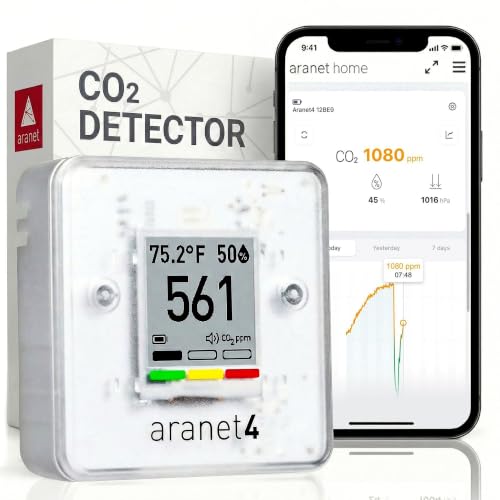
- E-ink displays (Aranet4) are readable in any light and never glow; LCD with backlight (Temtop C1+) is larger and brighter.
Step 3: Power
Battery, with a life measured in years at a 5 to 10 minute interval. The Aranet4’s two AA cells last up to four years; rechargeable units last weeks to months and need a charging routine somebody will forget. Avoid plug-in units unless a socket sits exactly where the monitor belongs.
Step 4: Durability and mounting
Choose a case that survives a fall from a shelf and a hook or screw mount so it stays put. Mount at about 1.5 m on a side or back wall, out of easy reach. Do not mount by the window (fresh air) or the door (corridor air) or above a radiator. See how to place a CO₂ monitor.
Step 5: Thresholds and the routine
| Reading | Color | Classroom action |
|---|---|---|
| Under 800 ppm | Green | None |
| 800 to 1,500 ppm | Amber | Open a window or the door at the next natural break |
| Over 1,500 ppm | Red | Open windows and door now; consider a short outdoor break |
Teach the class what the colors mean; pupils are reliable enforcers. Airing the room fully at every break resets it.
Step 6: Logging for the school
Facilities teams benefit from a record: which rooms are worst, whether mechanical ventilation is working, whether window policies are followed. Bluetooth monitors export from a phone during a walk-round; Wi-Fi units feed a dashboard. For a whole school, a fleet of simple battery monitors plus a few Wi-Fi loggers in the worst rooms is usually the practical mix. See how to export CO₂ monitor data.
Procurement checklist
- NDIR sensor, stated accuracy, range to 5,000 ppm or more
- Large display with configurable color thresholds
- Battery life of at least one school year
- Wall mount and robust case
- Manual calibration option (rooms never empty fully during the week; automatic correction can drift); see why automatic calibration can be wrong
- Data export for a sample of rooms
Monitors meeting this list are compared in best CO₂ monitors for home and office.
Recommended Tools


Products shown because their documented specifications fit this guide. Price and availability are on Amazon and can change.
Frequently Asked Questions
What CO₂ level should a classroom stay under?
Guidance in several countries targets under 1,000 ppm during lessons, with 800 ppm as the well-ventilated benchmark and 1,500 ppm as the level requiring immediate action.
Where should a classroom CO₂ monitor be placed?
At about 1.5 m on a side or back wall, away from windows, doors, radiators and the teacher's desk, and out of reach of pupils where possible.
Battery or plug-in for classrooms?
Battery, with multi-year life. Sockets are rarely where the monitor should go, and trailing cables in classrooms are a hazard.
Affiliate disclosure: Akermin earns a commission from qualifying Amazon purchases made through links on this page. Our editorial picks are based on documented specifications and owner feedback, not commissions.