As an Amazon Associate, Akermin earns from qualifying purchases. Product links on this page are affiliate links.
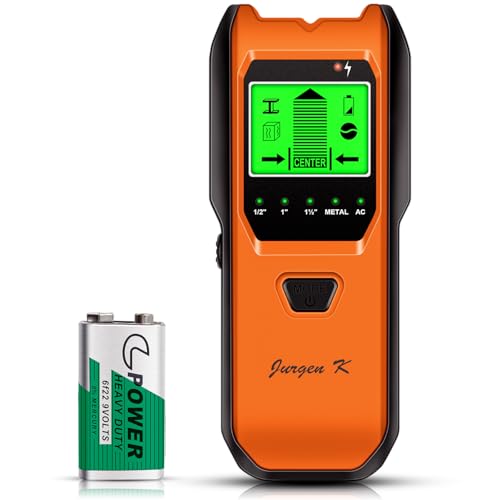
Jurgen K · Stud Finder Wall Scanner, 5 in 1 Multifunction Stud Locator with Smart Sensor, HD LCD Display and Audio Alarm for The Center & Edge of Metal, Studs, AC Wire, and Pipe Detection (Tropical Orange)
View on AmazonPrice and availability are shown on Amazon and can change at any time.
The Jurgen K 5-in-1 is a capacitive stud finder with three selectable stud depths (13 mm, 25 mm and 38 mm), plus metal scan to 60 mm and AC scan to 51 mm. It suits hanging shelves, mounting a TV bracket or locating joists before a light renovation. It is not a thermal camera and cannot image moisture, heat or concealed pipes that carry no current. If you need to see inside a wall rather than infer what is behind it, a thermal imager is the better instrument.
The depth mode is the specification that decides the job
A stud finder does not see wood. It measures a change in capacitance at the wall surface. Drywall, plasterboard and the air behind it have a certain dielectric behaviour; a timber stud or a metal pipe changes that locally, and the electronics register the shift. The strength of that shift falls with distance, which is why the listing publishes three stud scan depths rather than one: 13 mm (1/2 inch), 25 mm (1 inch) and 38 mm (1.5 inch).
Those numbers are the deciding specification. A 13 mm setting is the most sensitive and is intended for thin wall coverings where the stud sits close to the surface. A 38 mm setting reaches deeper but is correspondingly less able to resolve a narrow target, so it is used where the wall build-up is thicker. Choosing the wrong depth is the most common reason a stud finder appears to fail: the tool is working, but it is looking at the wrong layer.
The listing also gives metal scan to 60 mm and AC scan to 51 mm. Those are separate modes, not stud depths. Metal scan finds screws, conduit, pipe and reinforcement; AC scan finds live conductors. Neither tells you the thickness of what it finds.
What the LCD and audio alarm actually tell you
The display shows the selected stud material and the position of the stud, and the listing states that a pecking shape appears when an object is detected, alongside a continuous beep. That combination is useful because it gives you two channels at once: you can watch the screen while sliding the tool and listen for the change in tone. On a ladder, with one hand holding a bracket, the audio channel is often the one you rely on.
The listing does not publish a detection accuracy figure in millimetres, and it does not give a minimum stud width or a maximum wall thickness beyond the three depth settings. Those are the numbers a careful buyer would want, and they are not stated in the listing bullets. Treat the depth settings as the published limit and do not assume the tool will resolve a stud through a thick tiled or rendered wall simply because a similar tool does.
There is a backlit LCD and a low power indicator. The listing states a 9V battery is included. It does not publish battery life, and it does not state whether the backlight is automatic or switched.
Calibration is not optional, and the listing explains why
The listing gives a specific calibration sequence: place the tool flat on the wall, turn on the power, then hold the scan button until the beep and the screen display disappear. That sequence matters because a capacitive sensor is measuring a small electrical change against a reference. If the reference is set in air and then the tool is placed on a wall, the reading drifts. Calibrating on the actual wall surface sets the reference where the measurement will be taken.
The practical consequence is that you calibrate on every new wall, and on the same wall if you move to a different height or a different material. A painted wall, a wallpapered wood floor and a soundproof ceiling are all named in the listing as surfaces the tool can work on, and each has a different baseline. The ergonomic non-slip grip helps here because calibration requires the tool to sit flat and still.
This is also the step owners most often skip. A stud finder that beeps at everything is usually one that was calibrated in the wrong place.
Where a stud finder stops being the right answer
A stud finder infers structure from a surface measurement. It cannot show you a thermal pattern, so it cannot find a water leak that has soaked insulation without changing the wall’s capacitance, and it cannot show a missing insulation patch or a cold bridge. Those are jobs for a thermal imager, and the site covers them in building envelope inspection cameras and in leak-finding thermal cameras.
AC scan locates live conductors. It does not prove a circuit is dead, and it should never replace a voltage tester or a multimeter before you drill. If you are working near wiring, the relevant comparison is a proper electrical tester, covered in multimeters for home and DIY.
The metal scan mode is not a pipe locator in the sense of finding a plastic drain. It responds to metal, and the listing does not claim plastic pipe detection. A plastic soil pipe behind a wall will not register on metal scan.
How the Jurgen K compares with a thermal camera in the same category
The site’s thermal-inspection category includes USB-C thermal cameras such as the Thermal Master P3, the AMPBANK M192 and the VEVOR Thermal Imaging. Those are imaging instruments: they produce a picture of surface temperature and are the correct tool for finding a hot joint, a cold draught or a damp patch. The Jurgen K is a point detector: it reports the presence and approximate position of a stud, a metal object or a live wire, and nothing about temperature.
If your task is hanging a cabinet or finding a joist, the stud finder is faster and simpler. If your task is diagnosing why a wall is cold or where water has tracked, the stud finder cannot answer it. The two instruments are not substitutes. The listing’s own framing, hanging a picture, installing a TV or renovating part of a home, is the right scope.
Verdict: a depth-selectable stud finder for mounting work
The Jurgen K 5-in-1 is a sensible choice for a homeowner or tradesperson who needs to find studs, metal and live AC wiring before fixing something to a wall. Its three stud depths (13 mm, 25 mm and 38 mm) are the specification that decides whether it can see your studs, so match the mode to the wall build-up. It is not a thermal imager, it does not detect plastic pipe, and it does not replace a voltage tester. The listing does not publish a detection accuracy figure or battery life, and those gaps should be weighed before purchase.
Recommended Tools


Products shown because their documented specifications fit this guide. Price and availability are on Amazon and can change.
Frequently Asked Questions
What do the three stud scan depths mean in practice?
The listing gives 13 mm (1/2 inch), 25 mm (1 inch) and 38 mm (1.5 inch). These are depth settings, not accuracy figures. Use the shallowest setting that still detects the stud reliably; a deeper setting reaches further into the wall but is less able to resolve a narrow target.
Can it find a plastic water pipe behind a wall?
The listing names metal scan and AC scan. It does not claim plastic pipe detection. Metal scan responds to metal, so a plastic pipe will not register unless it contains metal or is close enough to a metal fixing to be picked up indirectly.
Does the AC scan make it safe to drill near wiring?
No. AC scan locates live conductors by detecting their field. It is a locating aid, not a proof of dead circuit. Isolate the circuit and verify with a voltage tester or multimeter before drilling.
How accurate is the stud centre indication?
The listing does not publish a detection accuracy in millimetres. It states that the LCD shows the position of the stud and that a pecking shape and beep indicate detection. Without a published figure, treat the indication as a guide and confirm with a small pilot hole where the fixing is critical.
Does it need calibrating on every wall?
The listing describes a calibration sequence: place flat on the wall, power on, hold scan until the beep and display disappear. Because the sensor measures a change against a reference, calibrating on each new surface is the reliable practice, and the listing presents calibration as necessary for accuracy.
Is it a thermal camera?
No. It is a capacitive stud, metal and AC locator. It does not produce a thermal image and cannot show temperature differences, moisture patterns or missing insulation. For those tasks a thermal imager is required.
Affiliate disclosure: Akermin earns a commission from qualifying Amazon purchases made through links on this page. Our editorial picks are based on documented specifications and owner feedback, not commissions.
Related Guides

FLIR One USB-C Thermal Imaging Camera Review: The Phone-Attachment Baseline
A detailed review of the FLIR One USB-C thermal camera for Android, explaining its Vivid IR upscaling, MSX image blending, stated accuracy and the practical limits of a phone-attachment design.
Read More→
Wagner Meters Orion 950 Pinless Wood Moisture Meter: A Review for Thermal Inspection Work
A review of the Wagner Meters Orion 950 pinless wood moisture meter, explaining its dual depth measurement, Bluetooth reporting, and where it stops being the right instrument next to a thermal camera.
Read More→
Tramex Moisture Encounter ME5 Review: The Dual-Depth Pinless Meter
A detailed look at the Tramex ME5 pinless moisture meter, centered on its dual-depth measurement and its practical limits.
Read More→